Most people get this backwards. They hear “AI” and immediately think they need to build a custom app. Or they go the other way and try to automate something with Zapier that genuinely requires real intelligence. Both mistakes cost time, money, and momentum.
The reality is there’s a full spectrum of options between “I clicked a button in a no-code tool” and “I have a team of engineers building a production AI system.” Knowing where your problem actually sits on that spectrum is the difference between shipping something useful in a week and spending six months building something you didn’t need.
Here’s the breakdown.
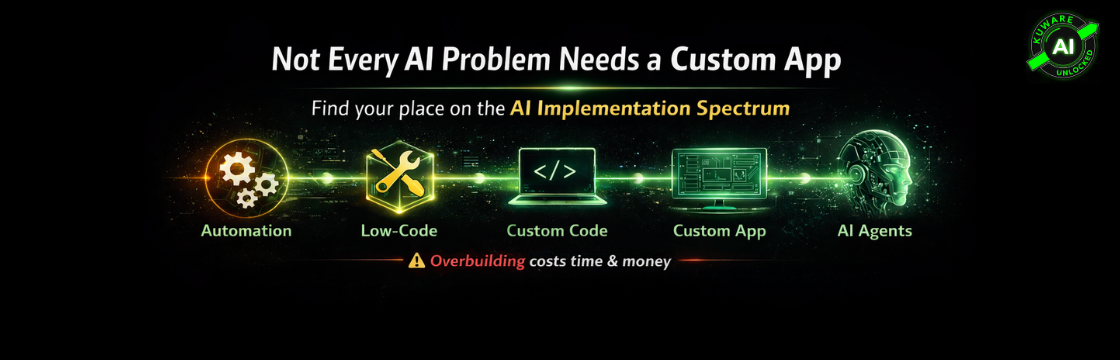
The Spectrum at a Glance
Think of it as five general zones, each one requiring more technical depth, offering more control, and handling more complexity than the last. But here’s the thing, more complex is not better. The right level is the one that matches your actual problem. Nothing more.
Zone 1: No-Code Automation
Zone 2: Low-Code AI Builders
Zone 3: Custom Code with AI APIs
Zone 4: Full AI Applications
Zone 5: Agentic AI
Zone 2: Low-Code AI Builders
Zone 3: Custom Code with AI APIs
Zone 4: Full AI Applications
Zone 5: Agentic AI
Worth noting before we get into each: there are also implementation tools that sit across multiple zones, things like LangChain, RAG (retrieval-augmented generation), open-source LLMs versus proprietary APIs, and others. Those are separate topics that go deeper into the “how to build” side. We’re focused here on helping you understand the landscape so you’re not confusing a screwdriver for a hammer.
Zone 1: No-Code Automation (Zapier, n8n, Make)
This is where most businesses should start. Tools like Zapier, n8n, and Make (formerly Integromat) let you connect apps and trigger actions without writing a single line of code. And all three now have AI capabilities baked in.
When it works well: You need to automate something repetitive and rule-based. A form submission triggers a Slack message. A new lead in your CRM starts an email sequence. An invoice comes in and gets routed to accounting.
The AI layer: All three platforms let you drop in an AI step. Summarize an email before routing it. Classify an incoming support ticket. Generate a draft response. This is a genuine AI utility at low cost and low complexity.
Zapier vs n8n vs Make: Zapier is the most beginner-friendly and best for straightforward linear workflows. Make has a visual canvas interface that handles branching logic and multi-path scenarios well. n8n is the most powerful of the three; it’s open-source, self-hostable, and has native AI agent nodes and LLM integrations built directly into its workflow builder. If you want the automation layer and the “AI you own, not rent” philosophy to align, n8n running on your own server is worth the extra setup time. For most non-technical teams starting out, Zapier is fine. For anyone who wants power and ownership, n8n is the better long-term choice.
Example: A wellness business gets 50+ intake forms per week. Rather than building anything custom, an n8n workflow handles it: form submits, AI summarizes the intake responses into a 3-line brief, routes it to the right practitioner with context. Done in a day. No developers involved.
When you’ve outgrown it: When the logic gets too complex, when you need real-time data processing, when you need fine-grained control over prompts, or when you’re spending more time fighting the tool’s limitations than solving the problem.
Prototyping value: This is also underrated as a prototyping layer. Build the flow in Zapier or n8n first. Validate that the logic works, that people use it, that the AI outputs are actually useful. Then, if it needs to scale or handle more users, you convert it to code. Building in a no-code tool first is not a step backwards; it’s smart iteration.
Zone 2: Low-Code AI Builders (Flowise, Dify, Botpress)
This zone is for teams that need more control over their AI flows but aren’t ready, or don’t need to write full custom code. Platforms like Flowise, Dify, and Botpress let you build AI pipelines visually, with far more flexibility than Zapier.
When it works well: You want to build a custom chatbot, a document Q&A tool, or a multi-step AI workflow. You need to control the prompt structure. You want to connect your own data sources.
Example: An internal HR tool that lets employees ask questions against the company policy manual. You load the documents, configure retrieval, set the prompt guidelines, and deploy. No engineering team required, but you do need someone comfortable with these platforms.
Where it fits in the spectrum: Think of this as Zapier’s more capable sibling for AI-specific workflows. You’re still working visually, but you have direct access to the AI plumbing. Great for internal tools, MVPs, and cases where a developer would be overkill.
When you’ve outgrown it: When you need custom business logic the platform can’t handle. When you’re hitting rate limits or cost structures that don’t work at scale. When you need tight integration with your existing codebase.
Zone 3: Custom Code with AI APIs (Claude API, OpenAI API, Gemini API)
Here’s where a developer enters the picture. You’re writing actual code, Python, JavaScript, whatever your stack is, and calling AI model APIs directly.
When it works well: You need real control. Custom prompt engineering. Response parsing and validation. Integration with your database, your auth system, your business logic. You want the AI behavior to be exactly what you define it to be.
The API landscape: Claude’s API (Anthropic), OpenAI’s API, and Google’s Gemini API are the main proprietary options. Each has different strengths in terms of reasoning depth, cost, context window, and speed. When working through examples, we often use Claude, but the concepts apply regardless of which provider you choose. You’re making an API call and handling the response. The logic is yours.
Open-source alternative: This is also the zone where open-source LLMs become relevant. Running a model like Llama, Mistral, or Phi on your own infrastructure means you own the compute, you control the data, and you pay once rather than per-token. AI you own is more valuable long-term than AI you rent. Not always the right call, but worth understanding as an option.
Example: A manufacturing client needed a tool that would ingest shift reports (plain text files), extract anomalies, and push structured alerts to their ops dashboard. Not a product anyone could buy off the shelf. We wrote a Python script, called the Claude API, parsed the JSON responses, and integrated it with their existing system. Maybe 300 lines of code total. Clean, fast, and fully under their control.
When you’ve outgrown it: When the thing you’ve built needs to be used by many different users with accounts, permissions, billing, and a real UI. That’s when you’re building an application, not a script.
Zone 4: Full AI Applications
This is a proper software product. A web application with a frontend, backend, database, authentication, and AI capabilities embedded throughout. Think of the AI as a powerful feature inside a larger system, not the whole system.
When it makes sense: You’re building something for more than just yourself or your internal team. Multiple users with different roles. Business logic beyond what a script can handle. You need deployment, uptime, security, and scalability.
What this requires: A real development stack. Frontend, backend API, database, hosting. The AI integration is often one component among many. This is where tools like LangChain can help manage the AI orchestration layer within the application, but again, that’s an implementation detail inside this zone, not a zone of its own.
Example: PPCRush.ai and PPCReveal.ai are full applications with user accounts, dashboards, and AI-driven functionality. Those weren’t built in Zapier. But we also didn’t need to build full applications to serve a single client’s internal workflow.
The important question to ask: Do you actually need this? A lot of people jump to Zone 4 because it feels more serious or impressive. But if your use case only has five users and straightforward logic, Zone 3 or even Zone 2 is the better answer. Building a full application to solve a one-person problem is a classic over-engineering trap.
Zone 5: Agentic AI (OpenClaw, Claude Code, OpenHands)
Agents are different from everything else on this list. And this is where a lot of people get confused; they treat agents as simply the “most advanced” version of everything above. That’s not quite right.
An agent is an AI system that can take multi-step actions autonomously to complete a goal. It can use tools, browse the web, write code, read files, make API calls, and reason across multiple steps without you directing every move. The intelligence is managing the flow, not just answering a question.
OpenClaw is probably the most striking current example of what agentic AI looks like in practice. It’s an open-source personal AI assistant that lives on your computer and communicates through WhatsApp, Telegram, iMessage, or Discord. It has persistent memory, runs 24/7, builds its own skills through conversation, integrates with your email, calendar, files, and essentially anything on your machine, and it’s self-hostable. Context and skills live on your own computer, not in a walled garden. That combination of always-on, self-expanding, and infrastructure-you-own is what makes it a genuinely different category from a chatbot or a workflow tool.
Claude Code approaches the agentic layer differently; it’s more interactive and developer-focused, with scheduled tasks and expandable skills that let you build sophisticated workflows within it. OpenHands (formerly OpenDevin) is built specifically for autonomous coding tasks, useful for technical teams that want an agent handling software development work end to end.
When agents are the right call: One-off or irregular tasks where the goal is clear but the steps aren’t fully predictable. “Research our top five competitors and summarize their pricing pages.” “Find all invoices in this folder, extract the totals, and create a summary spreadsheet.” You want the AI to handle it end to end, figure it out, and bring you the result.
The one-off vs. repeatable distinction: This is the key decision point. Agents shine when you’re doing something once, or infrequently enough that building a proper workflow isn’t worth it. If you’re doing the same thing every day, same inputs, same logic, same output structure , you’re better off with a proper automation flow (Zone 1 or 3) or an application (Zone 4). Agents aren’t a replacement for good automation architecture.
One more consideration: Agents are generally not the right answer for multi-user products. If you’re building something dozens of people will use every day, you want a proper application with defined logic, not an agent improvising its way through your business processes.
Before You Build Anything: Define the Flow
Here’s the thing that trips up most teams, and it doesn’t matter which zone you’re working in. Every automation tool, every custom script, every full application they all require a well-defined flow before you touch a single tool.
Clear starting point. Clear ending point. Clear decision points and branches in between. If you can’t draw it on a whiteboard, you can’t build it reliably. Zapier needs it. n8n needs it. A custom Python script needs it. A full application definitely needs it. The tool doesn’t define the logic; you do, before the tool ever enters the picture.
This is where a lot of AI implementations stall or fail. Not because the technology couldn’t handle it, but because nobody sat down and mapped out exactly what “done” looks like, what triggers the process, what happens when something goes wrong, and who (or what) needs to act at each step.
And here’s where it gets interesting: if you genuinely don’t know what your flow should look like yet, maybe the process is fuzzy, done differently every time, or you’ve never had to articulate it, this is actually a perfect use case for an agent. Use OpenClaw or Claude to help you discover and document the flow before you build anything. Describe the outcome you want. Let the agent walk through it with you, ask clarifying questions, surface the decision points you didn’t realize existed, and draft the process map. Once you have that clarity, then you pick your zone and build.
Most people try to figure out the flow by building. The smarter move is to figure out the flow by thinking, and agents are excellent thinking partners for exactly this kind of structured discovery work.
How to Decide
Four questions. That’s all you need.
How often does this run? One-off or irregular, consider agents. Daily or frequent, consider automation or custom code.
How many people need to use it? Just you or a small internal team, automation tools, or scripts are fine. Broader user base, build an application.
How much control do you need over the AI behavior? Low, no-code tools work. High, custom code with direct API access.
Are you still figuring out if this is even useful? Build the simplest version first. Zapier or n8n lets you validate the idea before investing in code. Prototype first, engineer second.
The Over-Engineering Trap
Worth saying directly: the most common mistake we see with our clients at Kuware is not under-investing in AI. It’s over-engineering early. Someone wants to automate customer follow-ups and immediately starts talking about building a custom LLM application. Or they want a document summarizer and jump straight to a full-stack app before confirming anyone will actually use it.
Start simple. Validate. Then add complexity only when the simpler version genuinely can’t handle the problem.
The spectrum exists because different problems live at different levels. A great outcome at Zone 1 beats a half-finished product at Zone 4 every time.
