
Most people building AI apps obsess over the model.
Should we use GPT? Claude? Gemini? Which one is smarter? Which one reasons better? Which one gives the cleanest answer?
Fair questions.
But once you move from playing with AI to actually building AI into a business process, another question starts mattering a lot more:
Why is this thing so expensive and slow every time it runs?
That’s where prompt caching comes in.
And honestly, it’s one of the least glamorous but most important AI engineering concepts business owners need to understand.
Not because every CEO needs to know how transformer attention works. They don’t.
But because this one technical detail can be the difference between an AI app that has healthy margins and one that quietly burns money every time a user clicks “submit.”
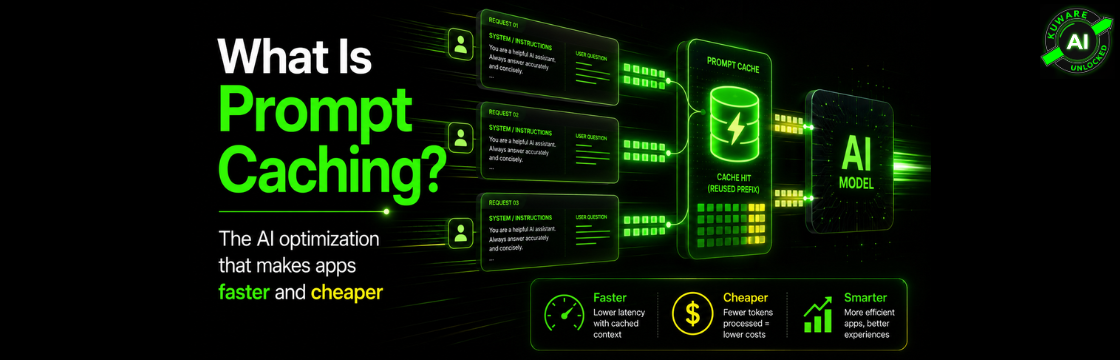
The Simple Version: Prompt Caching Reuses the Parts of the Prompt That Don't Change
Every AI request has two kinds of content.
There is the static part:
- System instructions
- Brand rules
- Examples
- Tool definitions
- Output format instructions
- Compliance rules
- Product documentation
- Long reference material
- Conversation history that has already been processed
Then there is the dynamic part:
- The user’s new question
- The latest form submission
- A new file
- A fresh CRM record
- Current tool results
- The thing that changes from request to request
Without prompt caching, the AI model may process the entire prompt from scratch every time.
That means if your app sends a 25,000-token system prompt, brand guide, tool schema, and document context on every request, the model keeps rereading all of it. Again and again.
Prompt caching says: we’ve already seen this stable prefix before, so don’t recompute it from zero.
OpenAI describes prompt caching as routing API requests to servers that recently processed the same prompt, making repeat prompts cheaper and faster. Their docs say it can reduce latency by up to 80% and input token costs by up to 90%. It also works automatically on supported OpenAI API requests.
That’s not a small optimization.
That’s margin.
What Is Actually Being Cached?
Here’s the slightly more technical version.
When a large language model reads your prompt, it doesn’t just “read words” like a person. It converts tokens into internal mathematical representations. During the model’s attention process, it creates something called a KV cache, short for key-value cache.
Think of the KV cache as the model’s internal processed state for the prompt so far.
Once that state exists, the model doesn’t need to fully recompute the same prefix again. If a later request starts with the same exact content, the provider can reuse that internal state and only process the new part.
OpenAI’s docs describe these key/value tensors as intermediate representations from the model’s attention layers produced during prefill. Anthropic explains it similarly: the system checks whether a prompt prefix is already cached, uses the cached version if found, and otherwise processes the full prompt and caches the prefix once the response begins.
So the big idea is simple:
Prompt caching saves the cost of rereading the same long instructions, documents, and setup context over and over again.
You still send the prompt.
The provider still checks the prompt.
But if the beginning of the prompt matches a cached prefix, a lot of the expensive work has already been done.
The Keyword Is "Prefix"
This part matters.
Prompt caching is usually based on the beginning of the prompt, not random matching anywhere inside it.
If your app sends:
					[Static instructions]
[Brand rules]
[Examples]
[Tool definitions]
[User question]
That is cache-friendly.
But if your app sends:
					[Timestamp]
[User ID]
[Random request metadata]
[Static instructions]
[Brand rules]
[Examples]
you may have just killed the cache.
Why? Because the prefix changes every time.
OpenAI is very clear on this: cache hits are only possible for exact prefix matches, and static content should go at the beginning while user-specific content should go at the end.
This is where many AI apps lose money without realizing it.
The developer adds a timestamp, session ID, random JSON ordering, or per-user metadata at the top of the prompt. Everything still “works,” but the cache hit rate collapses.
The app gets slower.
The bill goes up.
Nobody notices until usage grows.
A Real Business Example
Let’s say you build an AI sales assistant for a home services company.
Every request includes:
- Company positioning
- Offer details
- Service area rules
- Pricing guidelines
- CRM field definitions
- Tone instructions
- Examples of good responses
- Compliance notes
- Call transcript formatting rules
That static setup might be 10,000 to 30,000 tokens.
Then the actual user input might be small:
Here is the latest call transcript. Summarize it, score lead quality, and recommend the next action.
Without caching, the model may process the entire static setup every time.
With caching, the stable setup can be reused, and the model spends most of the new compute on the fresh transcript and answer.
That is exactly the type of workload where prompt caching shines.
Not one-off prompts.
Not tiny prompts.
But repeated AI workflows with large stable context.
Why Prompt Caching Matters for AI Apps
There are four big benefits.
1. Lower latency
The most noticeable improvement is often time to first token, or TTFT.
That’s the delay between sending the request and seeing the first word come back.
In production apps, TTFT matters. Users don’t care that your prompt is technically brilliant if the app feels slow.
A 2026 arXiv study on long-horizon agentic tasks across OpenAI, Anthropic, and Google found prompt caching reduced API costs by 41% to 80% and improved TTFT by 13% to 31% across providers.
That’s the academic version.
The business version is simpler:
The app feels faster.
2. Lower input-token cost
Cached tokens are usually cheaper than fresh input tokens.
For example, OpenAI’s current pricing page lists GPT-5.5 at $5.00 per 1M input tokens and $0.50 per 1M cached input tokens. GPT-5.4 is listed at $2.50 per 1M input tokens and $0.25 per 1M cached input tokens.
Anthropic’s pricing model is different. Their docs say 5-minute cache writes cost 1.25x the base input price, 1-hour cache writes cost 2x the base input price, and cache reads cost 0.1x the base input price.
Google’s Gemini pricing also includes context caching prices, and Google Cloud docs say implicit caching provides a 90% discount on cached tokens compared to standard input tokens.
Pricing changes, so always verify current provider pricing before building your cost model.
But the pattern is clear: repeated context is where the savings are.
3. Better scalability
When every request recomputes the same long prompt, your cost grows almost linearly with usage.
That gets ugly fast.
Prompt caching changes the economics. If 70% or 80% of the prompt is reused across requests, your effective cost per request can drop meaningfully as traffic increases.
That matters for:
- AI customer support bots
- Internal knowledge assistants
- Proposal generators
- AI intake tools
- Coding agents
- Research agents
- RAG apps
- Workflow automation tools
The more repeated structure your AI app has, the more caching matters.
4. Better product margins
This is the part I care about most for real businesses.
A lot of AI products look profitable in a demo and become painful in production.
Why?
Because the demo has 20 users.
Production has 2,000.
Suddenly every bloated prompt, every unnecessary document injection, every cache miss, and every repeated tool schema shows up on the bill.
Prompt caching is not just an engineering trick. It’s a pricing and margin lever.
OpenAI vs. Anthropic vs. Gemini: The Practical Differences
The concept is the same, but the providers handle it differently.
OpenAI
OpenAI prompt caching is automatic for supported models, including gpt-4o and newer. The prompt needs to be at least 1,024 tokens for caching to apply. OpenAI also states that cached token counts are visible in usage details, which is exactly what you should monitor in production.
OpenAI also supports prompt cache retention settings on newer models, including extended retention up to 24 hours on supported models.
The practical takeaway:
Put stable content first. Don’t mess up the prefix. Track cached tokens.
Anthropic Claude
Anthropic gives more explicit control.
You can use automatic caching or block-level cache_control. Their docs say the default cache lifetime is 5 minutes, refreshed when used, with a 1-hour option available at higher write cost.
Anthropic also supports cache diagnostics and warns that timestamps, changing tool choice, images, inconsistent marker locations, and unstable JSON key ordering can break cache hits.
The practical takeaway:
Claude caching is powerful, but you need to be deliberate.
Google Gemini
Google has both context caching pricing and implicit caching behavior depending on the product path. Google Cloud docs say implicit caching is enabled by default for Google Cloud projects and recommends placing large common content at the beginning of the prompt and sending similar-prefix requests close together.
The practical takeaway:
Gemini can reward the same good prompt structure, but check whether you’re using implicit or explicit context caching.
Other providers and gateways
This gets more nuanced.
If you use API gateways or model routers, caching behavior may change. A May 2026 arXiv paper raised concerns about prompt cache isolation in gateway APIs and noted that many providers use per-account or per-organization caching to prevent data leaks.
That does not mean “don’t use gateways.”
It means don’t assume caching works the same through every abstraction layer.
Prompt Caching Is Not AI Memory
This is a common confusion.
Prompt caching does not mean the AI remembers your customer, your company, or your documents.
It does not decide what information matters.
It does not retrieve facts.
It does not improve reasoning by itself.
Prompt caching is an efficiency layer. It makes repeated prompt content cheaper and faster to process.
Memory and RAG are different.
A memory system decides what user history or business context should be pulled into the prompt. A RAG system retrieves the right documents or chunks. Prompt caching then helps process repeated parts of that prompt more efficiently.
OpenAI’s docs also state that prompt caching does not affect the final generated response. The response is still computed each time, while the prompt-processing work is reused.
So don’t sell prompt caching as intelligence.
It’s not intelligence.
It’s infrastructure discipline.
Best Practices for Using Prompt Caching
Here’s what we would look for when auditing an AI app.
Put static content first
System instructions, tool definitions, examples, schemas, and reusable documentation should be at the top.
Dynamic user-specific content should go later.
Stop changing the prefix
Avoid putting timestamps, request IDs, user IDs, random metadata, or live data before the reusable content.
Even small changes can break the match.
Normalize your prompt formatting
Stable JSON ordering matters.
Stable whitespace can matter.
Stable tool definitions matter.
If your app serializes objects differently from request to request, your cache hit rate can suffer.
Track cached tokens
Don’t guess.
Log cache metrics.
OpenAI exposes cached token usage in response usage fields, and Anthropic exposes fields such as cache_read_input_tokens and cache_creation_input_tokens.
Separate stable RAG from dynamic RAG
Not every retrieved chunk is equally dynamic.
Some business documents are reused constantly. Others are query-specific.
If the same knowledge base intro, policy section, or product catalog appears frequently, structure it so it can be cached.
Use longer TTL only when it makes economic sense
Anthropic’s 1-hour cache can help when follow-up requests may happen outside the 5-minute window, but it has a higher write cost. Their docs say the 1-hour cache is useful for longer-running agentic side tasks, delayed user replies, latency-sensitive follow-ups, and rate-limit utilization.
Don’t pay for longer caching just because it sounds better.
Run the math.
Design agents carefully
Agentic workflows are especially cache-sensitive because they may call tools repeatedly and grow long histories.
The 2026 agentic caching study found that strategic cache control, such as putting dynamic content at the end and excluding dynamic tool results, was more consistent than naive full-context caching.
That’s a big warning.
More caching is not always better.
Smarter caching is better.
A Simple Developer Pattern
For OpenAI-style automatic caching, the pattern is mostly structural:
					from openai import OpenAI

client = OpenAI()

response = client.chat.completions.create(
    model="gpt-5.4-mini",
    messages=[
        {
            "role": "system",
            "content": """
            You are an AI assistant for ACME Plumbing.

            Static company rules:
            - Brand voice
            - Service areas
            - Offer details
            - Output format
            - CRM field definitions
            - Examples
            """
        },
        {
            "role": "user",
            "content": "Dynamic user request goes here."
        }
    ]
)

print(response.usage.prompt_tokens_details.cached_tokens)
For Anthropic-style explicit caching, the idea is to mark the stable part:
					import anthropic

client = anthropic.Anthropic()

response = client.messages.create(
    model="claude-opus-4-8",
    max_tokens=1024,
    system=[
        {
            "type": "text",
            "text": """
            Long stable system prompt:
            - Instructions
            - Examples
            - Tool usage rules
            - Output schema
            """,
            "cache_control": {"type": "ephemeral"}
        }
    ],
    messages=[
        {
            "role": "user",
            "content": "Dynamic user request goes here."
        }
    ]
)

print(response.usage.cache_read_input_tokens)
print(response.usage.cache_creation_input_tokens)
The syntax will change by SDK and model version.
The architecture principle won’t.
Stable first. Dynamic last. Measure cache hits.
Where Prompt Caching Pays Off Most
Prompt caching is most useful when your app has large repeated context.
Good fits include:
- AI customer support systems with stable policies and knowledge bases
- Internal company assistants with recurring instructions and documentation
- Sales proposal generators with standard positioning and output rules
- Legal, finance, or healthcare workflow tools with long reference material
- Coding agents with repeated repo context and tool definitions
- AI research agents with long system prompts
- Multi-turn chatbots with persistent conversation history
- RAG applications that repeatedly inject the same core documents
Bad fits include:
- Tiny prompts
- One-off ad hoc requests
- Prompts where the beginning changes every time
- Apps with low traffic and no repeated structure
That last point matters.
Prompt caching is not magic dust. If your use case doesn’t repeat meaningful context, there may be little to cache.
The Kuware AI Take
Here’s the blunt version:
Most businesses are still thinking about AI at the “which model should I use?” level.
That’s fine at the experiment stage.
But production AI is different.
Production AI is about:
- Speed
- Cost
- Reliability
- Repeatability
- Monitoring
- Margins
- Architecture
Prompt caching sits right in the middle of all of that.
It won’t make a bad AI workflow good.
But it can make a good AI workflow commercially viable.
And that’s the real game.
Because the future of AI in business won’t be won by the company with the fanciest demo. It’ll be won by the company that can build AI systems that work every day, at scale, without the cost structure falling apart.
So if you already have an AI app, audit your prompts.
Look for the repeated parts.
Move them to the front.
Stop changing your prefix.
Track cached tokens.
Then watch what happens to latency and cost.
That’s not hype.
That’s engineering discipline.
And in AI, discipline is becoming the competitive advantage.
