Large Language Models are impressive right out of the box.
Models like GPT-4o, Claude, Gemini, Grok, Llama, Mistral, Qwen, and Gemma can write code, summarize long documents, draft emails, brainstorm campaigns, answer questions, and hold surprisingly coherent conversations.
But here’s the thing most businesses learn pretty quickly:
A powerful general model is not the same thing as a useful business system.
Out of the box, these models don’t really know your company. They don’t know your offers, your pricing logic, your internal processes, your edge cases, your compliance requirements, or the weird-but-important language your customers use when they’re close to buying.
So they hallucinate.
Or they give generic advice.
Or they sound polished but shallow.
Or worse, they sound confident while being wrong.
That’s where LLM customization comes in.
And no, I don’t mean chasing every shiny new model announcement or rebuilding your entire business around whatever AI term is trending this week. I mean taking a practical, layered approach to making these models useful for your specific workflows.
At Kuware, this is the part of AI implementation we care about most. Not the hype. Not the “AGI by Friday” crowd. The actual work: making AI save time, improve quality, reduce cost, and create measurable business value.
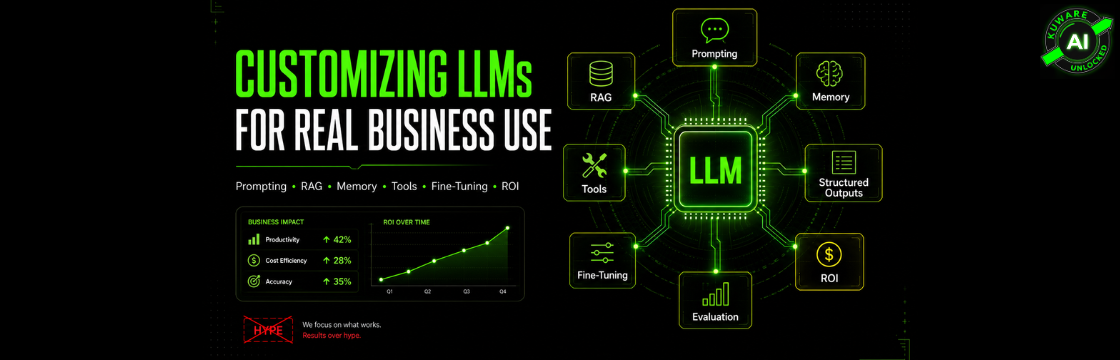
This guide breaks down the main ways to customize LLMs, from lightweight prompting to RAG, memory, tools, structured outputs, and fine-tuning.
Let’s separate what actually works from what just sounds good in a pitch deck.
First, understand what frontier models already know
Most modern LLMs start in roughly the same place.
They’re pre-trained on massive amounts of text: public internet content, books, code repositories, academic papers, forums, documentation, and other large data sources. That pre-training gives them broad language ability, general world knowledge, coding patterns, reasoning behavior, and some specialized skills.
The strongest models from companies like OpenAI, Anthropic, Google, xAI, Meta, Mistral, and others all start as generalists.
The differences come from things like:
- How the training data is filtered and curated
- How much compute is used
- What training techniques are applied
- How the model is post-trained for instruction following
- How alignment and safety behavior are handled
- Model architecture choices
- Context window size
- Tool use support
- Deployment infrastructure
That’s why one model might be better at coding, another better at long-form writing, another better at reasoning, and another cheaper to run at scale.
But even the best model still has a blind spot.
It doesn’t know your business.
It doesn’t know the sales objection you hear every week. It doesn’t know the internal SOP your operations manager updated last month. It doesn’t know your client onboarding process, your tone of voice, your compliance boundaries, or your product roadmap.
So customization is not optional if you want business-grade results.
It’s the bridge between “cool demo” and “useful system.”
Customization without touching the model weights
For most businesses, this is where the real ROI starts.
You don’t need to train a model from scratch. You don’t need a machine learning team. You don’t need to buy GPUs or argue about obscure benchmark scores.
You can get a lot done by controlling what the model sees, how it is instructed, what data it can retrieve, what tools it can use, and what format it must return.
This is where closed frontier models shine. You may not be able to access or modify the weights, but you still have powerful levers.
Context injection: the fastest way to improve output
The simplest way to improve an LLM is also the one people underestimate the most:
Put better information into the prompt.
That might sound basic, but it’s not just “write a better prompt.” Done properly, context injection becomes a real system design layer.
You can include:
- A detailed system prompt that defines the model’s role
- Brand voice rules
- Examples of good and bad responses
- Offer details
- Pricing rules
- Customer persona details
- Compliance constraints
- Formatting requirements
- Internal process notes
- Recent campaign context
- Sales positioning
- Preferred terminology
- Things the model must avoid
Some people call this Context-Augmented Generation, or CAG. I think of it as giving the model the right briefing before it starts working.
A weak prompt says:
“Write a blog post about AI for small businesses.”
A stronger system says:
“You are writing for Kuware’s audience of growth-minded business owners and operators. Avoid AI hype. Focus on practical ROI, implementation steps, risks, and examples from marketing, operations, and customer experience. Use a direct, human voice. Do not overpromise.”
Big difference.
Modern models with large context windows can handle a lot of injected information. That means you can include brand guidelines, customer research, prior content examples, call transcripts, and campaign strategy right inside the working context.
Where context injection works well
- Brand voice control
- Marketing copy
- Sales enablement
- Internal assistants
- Simple research workflows
- Drafting based on known inputs
- Reusable templates
- Role-specific copilots
Where it starts to break down
- The context gets too long
- The model misses details buried deep in the prompt
- You need constantly changing information
- You have many documents to search
- You need strict source grounding
- You need access control by user or department
That’s when you move to RAG.
RAG: the workhorse for business knowledge
RAG stands for Retrieval-Augmented Generation.
Terrible name. Very useful idea.
Instead of stuffing every possible document into the prompt, you store your knowledge base externally, then retrieve only the most relevant pieces when the user asks a question.
A basic RAG system works like this:
- You gather your documents.
- You split them into chunks.
- You convert those chunks into embeddings.
- You store them in a vector database or search index.
- A user asks a question.
- The system retrieves the most relevant chunks.
- The model answers using that retrieved context.
This is especially useful for businesses because most company knowledge lives outside the model.
Think about:
- Product documentation
- Service descriptions
- Client onboarding materials
- SOPs
- Sales scripts
- Proposal templates
- Support tickets
- Internal wikis
- Case studies
- Compliance documents
- Training manuals
- Meeting notes
- CRM records
- Campaign performance summaries
RAG lets a general model behave like it understands your company without actually retraining the model.
For many Kuware-style implementations, this is the highest-ROI starting point.
Not because RAG is glamorous. It isn’t.
It’s valuable because it solves one of the biggest business AI problems: the model needs to answer based on your actual source material, not whatever it “thinks” is probably true.
Good RAG is not just dumping PDFs into a chatbot
This is where a lot of businesses get disappointed.
They upload a bunch of documents, ask a question, get a mediocre answer, and decide “AI isn’t ready.”
Usually, the problem isn’t the model.
It’s the retrieval system.
Good RAG requires real design decisions:
- How should documents be chunked?
- Should chunks overlap?
- What metadata should be stored?
- Do we need keyword search plus semantic search?
- Should newer documents rank higher?
- Should certain sources be trusted more than others?
- Do users have permission to see all retrieved content?
- Should results be reranked before going to the model?
- Should the model cite sources?
- What happens when no good source exists?
- How do we prevent stale content from polluting answers?
For example, if your pricing policy is buried in a 90-page PDF and chunked badly, the model may never retrieve the exact section it needs. Then it improvises. That’s when hallucinations show up.
The best RAG systems are boring in the right way. Clean data. Good chunking. Useful metadata. Strong retrieval. Clear fallback behavior.
Boring wins.
Conversational memory: making assistants feel less disposable
Most AI interactions are treated like one-off transactions.
The user asks. The model answers. Everyone forgets everything.
That’s fine for simple questions. It’s terrible for real assistants.
A useful business assistant should remember context inside a session and, when appropriate, across sessions. It should know what the user already said, what preferences they shared, what project they’re working on, and what decisions were already made.
There are different levels of memory:
- Raw conversation history
- Summaries of prior conversations
- User profile facts
- Project-specific memory
- Entity extraction
- Vector-based long-term memory
- CRM or database-backed memory
- Team-level institutional memory
For marketing, memory can be incredibly useful.
An AI assistant can remember your brand voice, your target segments, campaign goals, top-performing offers, past objections, preferred CTAs, and what you tried last quarter.
For operations, it can remember process steps, approval rules, vendor preferences, escalation paths, and recurring issues.
But memory needs boundaries.
You don’t want an AI system remembering everything forever. That creates privacy, security, and quality problems. Some things should be remembered. Some should expire. Some should never be stored at all.
Memory makes AI feel smarter, but governance makes it safe.
Tool use: when the model stops being just a chatbot
This is the big jump.
A chatbot answers.
An AI agent acts.
Tool use, sometimes called function calling, lets the model interact with external systems. The model decides when a tool is needed, sends a structured request, receives the result, and then continues.
Tools can include:
- Web search
- Calculators
- Code execution
- CRM lookups
- Calendar access
- Database queries
- Marketing platform APIs
- Analytics tools
- Email systems
- Internal ticketing systems
- Proposal generators
- Reporting dashboards
- Ad platform data
- File search
- Payment or billing systems
This turns the LLM into an orchestration layer.
Instead of asking, “What should I do with my marketing data?” you can build an agent that pulls campaign data, compares performance, identifies weak segments, drafts a recommendation, creates a task list, and updates a CRM record.
That’s when AI starts moving from content generation to workflow automation.
But tool use also raises the stakes.
If the model can take action, you need guardrails.
You need permission checks. You need confirmations before risky actions. You need logs. You need clear limits on what tools can do. You need human approval where mistakes are expensive.
The model should not be allowed to casually email your entire prospect list, change pricing, delete records, or update a campaign budget without controls.
Useful agents are powerful. Uncontrolled agents are chaos with an API key.
Structured outputs: the unsexy thing that makes automation work
If you’re using AI inside a real workflow, free-form text is often not enough.
You need predictable output.
That’s where structured outputs come in.
Instead of letting the model respond however it wants, you force it into a specific format: JSON, a schema, a table, a classification label, a database-ready object, or another validated structure.
For example, you might ask the model to extract:
- Lead name
- Company
- Budget range
- Pain points
- Buying timeline
- Service interest
- Urgency score
- Recommended next step
And you don’t want a beautifully written paragraph.
You want clean fields your CRM can use.
Structured outputs are critical for:
- Lead qualification
- Data extraction
- Ticket routing
- Sales call summaries
- Compliance review
- Marketing personalization
- Document processing
- Automated reporting
- Internal workflow triggers
This is one of those features that doesn’t sound exciting until you’ve tried to run automation on inconsistent AI text.
Then it becomes essential.
Managed fine-tuning for closed models
There’s one nuance worth adding.
Even if you don’t have access to a closed model’s weights, some providers offer managed fine-tuning. That means you can upload training examples, tune behavior through the provider’s platform, and use a customized version through an API.
You still don’t control the weights directly.
But you can influence the model’s behavior more deeply than prompting alone.
This can help when you need:
- Consistent tone
- Repeatable formatting
- Narrow task performance
- Domain-specific response patterns
- Better handling of recurring workflows
- Lower prompt complexity
- More consistent classification or extraction
That said, fine-tuning is not magic.
It does not replace clean knowledge retrieval. It does not make the model reliably know every current fact in your business. It does not fix messy data. It does not remove the need for evaluation.
The rule I usually use is simple:
Use RAG for knowledge. Use fine-tuning for behavior. Use tools for action. Use evaluation for trust.
That one sentence can save a lot of wasted budget.
Fine-tuning open-weight models
When you use open-weight models like Llama, Mistral, Qwen, Gemma, or similar families, you get a different level of control.
Now you’re not just giving the model better instructions. You can actually adapt the model itself.
This is useful when you need more privacy, lower cost at scale, lower latency, domain-specific behavior, or self-hosted deployment.
But it’s also where teams can get lost.
A lot of people jump to fine-tuning too early because it sounds sophisticated. In reality, most business problems should start with prompting, RAG, tools, and evaluation.
Fine-tuning makes sense when the model keeps failing in a consistent way and you have enough quality examples to teach the desired behavior.
LoRA and QLoRA: the practical fine-tuning path
LoRA stands for Low-Rank Adaptation.
Instead of retraining the entire model, LoRA freezes the base model and trains small adapter layers. Those adapters teach the model new patterns without requiring massive compute.
QLoRA is a more memory-efficient version that makes fine-tuning possible on smaller hardware in many cases.
This is the sweet spot for many teams because it’s:
- Cheaper than full fine-tuning
- Faster to run experiments
- Easier to maintain
- Easier to swap between specialized adapters
- Good for narrow domain behavior
- Useful with relatively small high-quality datasets
- Less risky than updating every model weight
You might use LoRA or QLoRA to create:
- A legal document reviewer
- A customer support assistant trained on past resolutions
- A marketing copy assistant trained on winning campaigns
- A technical documentation assistant
- A medical admin support model
- A code review assistant for a specific stack
- An internal operations assistant
- A sales enablement copilot
The key phrase is high-quality examples.
A few hundred excellent examples can outperform thousands of sloppy ones. This is where businesses often underestimate the work. The training method matters, but the dataset matters more.
Garbage examples create garbage behavior.
Full fine-tuning: powerful, expensive, and often unnecessary
Full fine-tuning updates all model weights.
That can create deeper adaptation, but it comes with real costs:
- More compute
- More ML expertise
- More risk of breaking general abilities
- More maintenance
- More evaluation burden
- More deployment complexity
- More ways to waste money
There are cases where full fine-tuning makes sense.
If you have a large proprietary dataset, a very specific domain, strict deployment requirements, and a serious need for deep model adaptation, it may be worth it.
But for most businesses, full fine-tuning should not be the first move.
It’s like buying a commercial kitchen when you haven’t tested the menu yet.
Start smaller. Prove the workflow. Measure the value. Then decide whether deeper training is justified.
Continued pre-training: when you need deep domain language
Continued pre-training means taking a base model and continuing to train it on a large body of domain-specific text before instruction tuning.
This is different from teaching the model how to answer a support ticket or follow a format. It’s about exposing the model to a domain so deeply that the terminology, relationships, and patterns become more natural to it.
This can work well for:
- Legal domains
- Scientific research
- Healthcare administration
- Technical engineering fields
- Financial documents
- Insurance workflows
- Specialized manufacturing
- Large internal knowledge bases
- Industry-specific language
But again, this is not casual work.
You need enough clean domain text. You need infrastructure. You need evaluation. You need to watch for bias, outdated material, and contamination from low-quality documents.
For most small and mid-sized businesses, continued pre-training is not step one.
But for serious vertical AI products, it can be a strong move.
Preference tuning: teaching the model what "better" means
Sometimes you don’t just want the model to produce a correct answer.
You want it to prefer a better answer.
That’s where preference tuning comes in.
Methods like DPO, ORPO, and related approaches train the model using preferred and rejected responses. Instead of saying, “Here is the answer,” you show the model, “This answer is better than that one.”
This is useful for:
- Brand voice
- Reasoning quality
- Safety behavior
- Tone control
- Helpfulness
- Refusal behavior
- Formatting discipline
- Domain-specific judgment
- Reducing generic output
DPO, or Direct Preference Optimization, became popular because it is generally more straightforward than older reinforcement learning approaches.
In plain English, preference tuning is useful when quality depends on judgment.
For example, two marketing emails may both be “correct.” But one sounds like a real founder wrote it, while the other sounds like a corporate brochure trapped in a microwave.
Preference data helps the model learn the difference.
The missing piece most teams skip: evaluation
This is the part nobody wants to talk about.
Everyone wants the AI system.
Few people want to build the test set.
But without evaluation, you’re guessing.
And “it feels better” is not a strategy.
Before you roll out an LLM system, you need a way to test whether it is actually improving. That can include automated scoring, human review, side-by-side comparisons, task success rates, retrieval quality checks, and production monitoring.
A practical evaluation plan might track:
- Accuracy
- Hallucination rate
- Source citation quality
- Retrieval relevance
- Response usefulness
- Time saved
- Cost per task
- Latency
- Escalation rate
- User satisfaction
- Conversion lift
- Error severity
- Compliance issues
For a support chatbot, success might mean fewer escalations and faster resolution.
For a marketing assistant, success might mean better first drafts, faster campaign launches, stronger message consistency, and fewer review cycles.
For an internal operations assistant, success might mean employees find the right SOP faster and stop asking the same question in Slack every week.
Evaluation keeps AI honest.
It also keeps vendors honest.
Data readiness matters more than model choice
This is another hard truth.
Most companies do not have an AI model problem.
They have a data organization problem.
Their SOPs are outdated. Their sales materials contradict each other. Their pricing rules live in someone’s head. Their customer research is scattered across call recordings, spreadsheets, CRM notes, and old Google Docs.
Then they ask AI to “understand the business.”
Well, based on what?
Before customizing LLMs, clean up the knowledge layer:
- Identify the source of truth
- Remove outdated documents
- Resolve contradictions
- Tag documents by department, product, date, and audience
- Decide access permissions
- Create owner accountability
- Document recurring workflows
- Capture expert knowledge
- Build feedback loops
- Keep version history
This is not glamorous work.
It is also where a lot of the value is hiding.
AI forces operational clarity. That’s a good thing.
Security, privacy, and governance cannot be an afterthought
If your AI system touches customer data, employee data, medical data, financial data, legal documents, or proprietary business information, you need governance from day one.
That means thinking through:
- What data the model can access
- Who can access which documents
- Whether prompts and outputs are stored
- What gets logged
- How PII is handled
- What vendors can retain
- What actions require approval
- How mistakes are escalated
- What compliance rules apply
- How outputs are audited
- Whether self-hosting is required
- How data deletion works
This is especially important for regulated industries.
AI can be incredibly useful in healthcare, legal, finance, insurance, and other compliance-heavy spaces. But usefulness does not remove responsibility.
The goal is not to make AI reckless.
The goal is to make it reliable enough to trust in real workflows.
How to choose the right customization approach
Here’s the practical decision framework I use.
Start with the least expensive method that can solve the problem reliably.
Don’t fine-tune because it sounds advanced. Don’t build agents because they sound exciting. Don’t use RAG because someone put it on a conference slide.
Use the technique that matches the job.
Start with strong prompting and context injection when
- You need better tone
- You need role-specific instructions
- You have a manageable amount of background context
- The task is mostly drafting, summarizing, rewriting, or analyzing
- The workflow is low-risk
- You need fast iteration
Use RAG when
- The model needs access to company documents
- Facts change over time
- Answers need to be grounded in sources
- You have too much content for the prompt
- Users need document-specific answers
- You need department or client-specific knowledge
- You want better accuracy without training the model
Add memory when
- The assistant needs continuity
- Users return to the same project
- Preferences matter
- Repetition is wasting time
- The AI needs to build context over time
- You can store memory safely
- You have rules for what should not be remembered
Add tools when
- The model needs real-time data
- The workflow requires calculations
- The AI needs to update systems
- You want automation, not just answers
- The model must interact with CRM, analytics, calendar, email, or databases
- Human approvals can be built into the flow
- Logging and permissions are clear
Use structured outputs when
- Another system needs to consume the response
- You need clean fields
- You are extracting data
- You are classifying leads, tickets, documents, or risks
- Automation depends on predictable formatting
- Errors are expensive
- You want reliable downstream processing
Consider fine-tuning when
- Prompting still produces inconsistent behavior
- You have many high-quality examples
- You need a smaller, cheaper specialized model
- You need lower latency
- You need self-hosting or stronger privacy
- The task is repeated at scale
- The desired behavior is stable
Consider continued pre-training or deeper model work when
- You are building a serious vertical AI product
- You have large volumes of proprietary domain text
- The domain language is highly specialized
- Standard models consistently misunderstand core concepts
- You have the budget and expertise to maintain it
- Evaluation is mature
- The long-term business case is clear
That’s the stack.
Prompting gives direction.
RAG gives knowledge.
Memory gives continuity.
Tools give action.
Structured outputs give reliability.
Fine-tuning gives behavior.
Evaluation gives trust.
Common mistakes to avoid
A lot of AI projects fail in predictable ways.
Not because AI is useless. Because the implementation is sloppy.
Here are the mistakes I see most often:
- Trying to solve a knowledge problem with fine-tuning
- Using messy documents as a RAG knowledge base
- Forgetting access control
- Letting the model answer when it should say “I don’t know”
- Building agents without approval checkpoints
- Measuring vibes instead of outcomes
- Training on low-quality examples
- Ignoring latency and cost until production
- Overbuilding before validating the workflow
- Skipping human review in high-risk use cases
- Treating prompts like random text instead of system design
- Assuming bigger models automatically mean better business results
That last one is important.
The “best” model is not always the best model for your workflow.
Sometimes a smaller model with the right RAG setup beats a frontier model with poor context. Sometimes a simple structured extraction workflow creates more value than a fancy autonomous agent. Sometimes the best AI implementation is boring, narrow, and very profitable.
That’s a win.
What this looks like in real business work
At Kuware, we look at LLM customization through a business lens first.
Not “What can AI do?”
The better question is:
Where is the business leaking time, money, quality, or opportunity?
For a marketing agency, that might mean campaign analysis, reporting, content repurposing, proposal creation, lead scoring, or ad performance summaries.
For a healthcare business, it might mean patient intake support, internal knowledge search, documentation assistance, or admin workflow automation.
For a services business, it might mean customer support, onboarding, SOP access, sales follow-up, or internal training.
For legal or compliance-heavy teams, it might mean document review, clause extraction, risk flagging, or process consistency.
The customization approach depends on the job.
A client-specific knowledge assistant may only need RAG, permissions, source citations, and a strong system prompt.
A marketing automation agent may need tools, CRM access, analytics integration, structured outputs, and human approvals.
A specialized document reviewer may need LoRA fine-tuning, evaluation datasets, RAG for current policy documents, and strict audit logs.
The magic is rarely one technique.
It’s the stack.
A practical rollout plan
If you’re trying to bring this into your business, don’t start with a giant AI transformation project.
Start with one workflow.
Pick something painful, frequent, and measurable.
Good candidates include:
- Answering repetitive internal questions
- Summarizing sales calls
- Drafting first-pass proposals
- Routing support tickets
- Creating campaign reports
- Extracting fields from documents
- Reviewing content against brand guidelines
- Producing client-specific onboarding material
- Searching SOPs
- Turning meeting notes into tasks
- Generating follow-up emails
- Comparing performance data
Then build a small version.
Give it real documents. Give it real examples. Give it a clear success metric. Put it in front of real users. Watch where it fails.
Then improve.
That cycle matters more than the model logo.
A good implementation path looks like this:
- Define the workflow and success metric.
- Gather the source material.
- Clean and organize the knowledge base.
- Build the first prompt or RAG workflow.
- Test against real examples.
- Add structured outputs if automation is needed.
- Add tools only when actions are required.
- Add memory only when continuity creates value.
- Evaluate before rollout.
- Monitor after rollout.
- Fine-tune only when the business case is clear.
That’s not as flashy as a demo video.
It works better.
Final thought: focus on value, not hype
Customizing LLMs is not about chasing the newest model every month.
It’s about taking powerful general-purpose AI and adapting it to your actual business. Your data. Your workflows. Your customers. Your rules. Your voice.
Start simple.
Measure results.
Fix the knowledge layer.
Add tools carefully.
Use fine-tuning when it actually solves a behavior problem.
And please, don’t skip evaluation.
The models are already good enough to create real value. The difference comes from how well you adapt them to the work that matters.
That’s where the ROI is.
If your business is trying to figure out where AI can actually save time, improve customer experience, or unlock growth, start with one practical question:
What workflow would be meaningfully better if your team had a reliable AI assistant trained on your business?
That answer is usually the best place to begin.
