I’ll be honest. When this client first came to us, my first reaction was, “This already works… how much better can it really get?”
They had built a pretty clever setup using a Custom GPT. It wasn’t a toy. It was already producing useful structured reports from large document sets.
But there was one big problem.
It was not built for scale.
And that’s exactly where things got interesting.
What They Had Built
The system started as a Custom GPT with a domain-specific knowledge base.
Users could upload large project files, trigger workflows with specific prompt commands, and generate detailed professional documents. The Custom GPT would go through an intake process, organize the files, review the material, and produce structured reports.
On the surface, that sounds great.
And to be fair, it worked.
But only up to a point.
The Problem: Custom GPT Worked, But It Was Slow and Inconsistent
The biggest issue was speed.
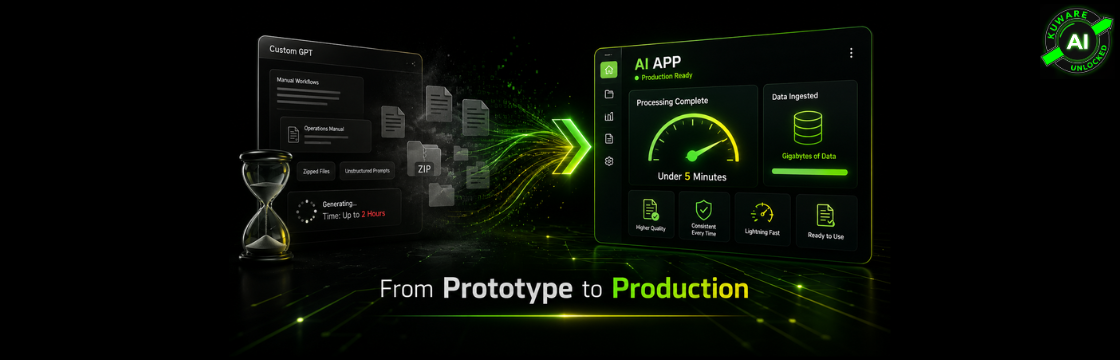
The original Custom GPT workflow could take up to 2 hours to produce the final results and documents.
Sometimes it was faster.
But when the project files were large, complex, or uploaded in zipped bundles, the workflow slowed down dramatically. The system had to unpack files, ingest them, retrieve the right material, interpret the instructions, and then generate the final output.
That is a lot to ask from a Custom GPT workflow.
And it became even harder when the data volume grew.
We were dealing with workflows that needed to ingest and reason over gigabytes of data, not just a few short documents.
That is where the Custom GPT approach started to break down.
The Second Problem: Output Quality Was Not Reliable Enough
Speed was only half the issue.
The other half was consistency.
The required report formats and workflow instructions were stored as operations manuals inside the knowledge base.
That meant the model had to:
- Retrieve the right manual
- Understand the instructions
- Interpret the format
- Generate the final document correctly
Sometimes it did a good job.
Sometimes the structure drifted.
A heading might change. A section might move. A required part might be missing or phrased differently.
For casual work, that may be acceptable.
For professional documents, it is not.
If an output needs to be client-ready, submission-ready, or used in an important business process, “close enough” is not good enough.
What We Changed
We didn’t just improve the prompt.
We rebuilt the workflow as a real application.
That meant moving from a flexible but limited Custom GPT setup to a structured AI app designed for performance, consistency, and scale.
1. We Built the App to Handle Large Data Properly
Instead of making the Custom GPT repeatedly deal with zipped files and large document sets during execution, we moved file handling into the app.
We:
- Unzipped files upfront
- Organized the content properly
- Prepared the data for retrieval
- Loaded the material into the right retrieval layer
- Designed the system to support gigabytes of source data
This was a major shift.
The Custom GPT was trying to process too much at runtime.
The app handled ingestion, organization, and retrieval more intelligently before the model was asked to reason over the material.
That alone changed the performance profile of the entire workflow.
2. We Moved Workflow Logic Out of Manuals
This was the real breakthrough.
The original system expected the LLM to read operations manuals through RAG and figure out how to create each document.
That is fragile.
So we moved the workflow logic into the app itself.
We converted:
- Commands
- Formatting rules
- Report structures
- Document requirements
- Workflow steps
into explicit prompts, sub-prompts, and app-level commands.
Now the model is not guessing what format to use.
The app tells it exactly what job to do.
3. We Created One-Click Workflows
Instead of requiring users to remember trigger phrases or special prompt commands, we created clear workflow actions inside the app.
The user can run structured steps like:
- Intake
- Organize
- Analyze
- Generate report
- Create final document
This made the system easier to use and much more reliable.
The workflow is now controlled by the app, not by whether the user typed the exact right instruction.
4. We Made Output JSON-First
This may have been the most important architectural change.
Instead of asking the LLM to produce the final formatted document directly, we asked it to produce structured JSON.
Then the app uses that JSON to generate the final document.
That means:
- The LLM handles reasoning and analysis
- The app handles formatting and document creation
This separation is critical.
It is one of the biggest reasons the final documents are now higher quality, more consistent, and produced in the exact required format every time.
The Results: From Up to 2 Hours to Under 5 Minutes
This is the part that matters.
The original Custom GPT workflow could take up to 2 hours to produce results and documents.
The new app produces the results in under 5 minutes.
And it does that while being able to ingest and work across gigabytes of data.
But speed was not the only improvement.
The app now produces outputs that are:
- Higher quality
- More consistent
- Better structured
- Easier to review
- Generated in the same format every time
- Ready to use with far less cleanup
This was not a small improvement.
This was the difference between an interesting AI prototype and a real production system.
What the App Can Do Now
The app now supports both structured document generation and general project chat.
The structured workflow can produce:
- Analysis reports
- Strategy documents
- Reference binders
- Submission-ready briefs or summaries
- Prognosis and recommendation documents
- Other standardized professional outputs
We also added a general chat interface so users can ask open-ended questions about the project, source material, or document set.
That is useful.
But it is not the core value.
The Real Value
The real value is simple:
One click → professional, ready-to-use document in under 5 minutes.
Not after 2 hours.
Not after repeated prompt tweaking.
Not after manual cleanup.
And not limited to tiny document sets.
A real app can handle large data, control the workflow, and produce consistent output at production speed.
The Big Lesson
Custom GPTs are excellent for proving an idea.
But once the workflow needs to handle large volumes of data, strict formatting, repeatable outputs, and real business expectations, a Custom GPT may not be enough.
The lesson is not “Custom GPTs are bad.”
They are not.
The lesson is that prototypes and production systems are different things.
If your AI workflow depends on the model reading manuals, guessing formats, processing huge files at runtime, and producing perfect documents every time, you will eventually hit limits.
Instead:
- Move file handling into the app
- Make workflows explicit
- Use structured prompts
- Ask the model for structured output
- Let the app generate the final document
- Design the system for scale from the beginning
Final Thought
This project didn’t succeed because we found “better AI.”
It succeeded because we built a better system around the AI.
That is the real shift.
The future of business AI is not just better prompting.
It is better architecture.
Better workflows.
Better data handling.
Better output pipelines.
That is how AI moves from demo to dependable business tool.
