AI agents are moving beyond chatbots. From Grok Bot and Claude to ChatGPT Dots and Meta Muse, personal agents can now manage ongoing work. Here’s how Avi Kumar uses a team of named AI agents to coordinate his businesses, and what this shift means for business owners.
For the past few years, using AI meant going to the AI. You opened a chat, explained the problem, got an answer, and carried that answer back to your other apps. The model might have done the thinking, but you still handled the handoffs.
That arrangement is starting to flip as personal AI agents begin working across email, calendars, files, and business apps. Some keep working after you close the window, bringing issues to your attention instead of waiting for you to find them.
I think this is a bigger change than another jump in model intelligence. AI is moving from helping us do tasks to managing parts of the workflow itself.
I’m testing that shift in my own businesses, and it has changed one habit in particular: I no longer assign tasks directly to my team. I route that work through my personal AI agents.
That doesn’t mean the agents run my companies or make every decision. It means I’ve stopped acting as the person who carries every request from one inbox to another.
My AI Team Has Names and Job Descriptions
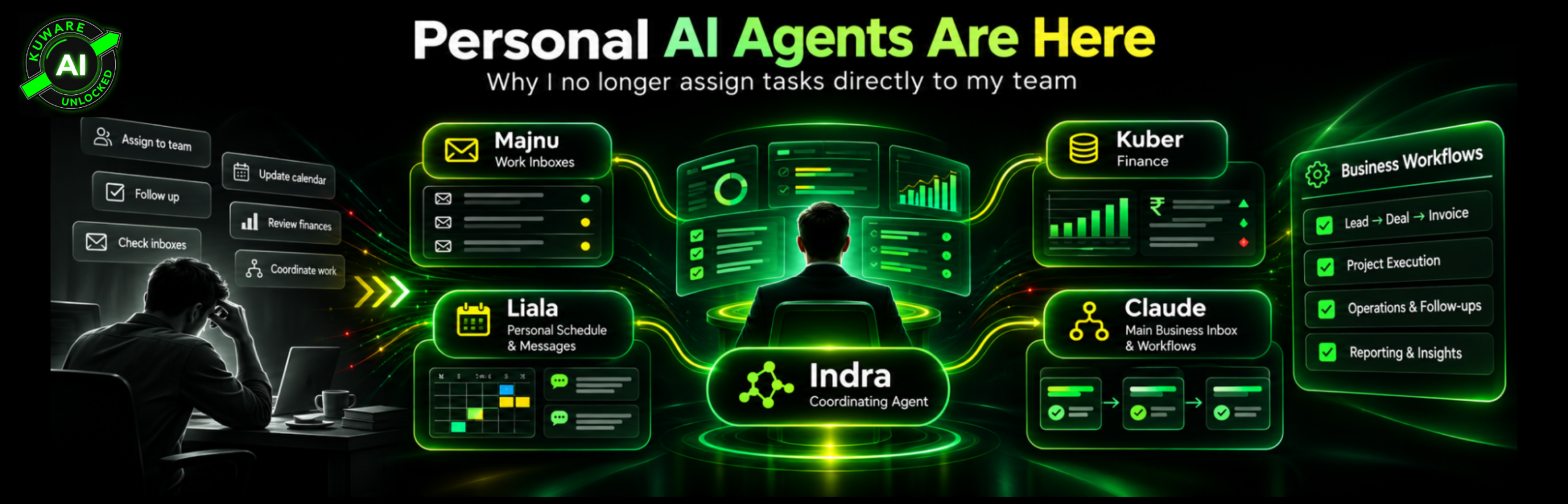
Most people still picture one AI assistant that handles whatever they type into a chat. I use several, with different jobs and a lead agent that manages the others.
| Agent | What I use it for |
|---|---|
| Indra | Coordinates my other agents and manages their work |
| Kuber | Named for the Hindu god of wealth, handles my finances |
| Liala | Manages my personal schedule, inboxes, and messages |
| Majnu | Handles work inboxes across my different businesses |
| Claude | Manages the main business inbox and related workflows |
Indra, Kuber, Liala, and Majnu are my Grok Bot agents. Claude handles a separate, important part of the setup. The names make the system easier to discuss, but clear areas of responsibility are what make it useful.
An email may call for a decision, a reply, an assignment, or a follow-up. Previously, I would read the message, work out the next step, assign it to someone, and follow up. Now I work through the agents rather than issuing each task myself.
I still make the decisions, and my team still does work that needs human skill. What changed is how tasks reach them.
I’m not suggesting every step is perfect or fully hands-off, since these tools can miss context, lose a login, or misunderstand a request. Even with those limits, I find myself thinking less about individual assignments and more about outcomes.
Everyone Just Launched a Personal Agent
There’s no settled name for this category, so every AI company has picked its own product and explanation.
| Company | Product | Where it fits, as of November 2026 |
|---|---|---|
| Meta | Muse | A personal agent in Muse and WhatsApp, rolling out in the United States |
| OpenAI | Dots | Ongoing agents in ChatGPT, rolling out on eligible Pro and business plans |
| xAI | Grok Bot | Named bots with cloud computers, available through supported paid plans |
| Gemini Spark | A personal agent tied closely to Google apps, with plan and region limits | |
| Microsoft | Copilot Cowork | Agent-based work inside Microsoft 365 Copilot |
| Anthropic | Claude and Duet | Claude’s connected work tools, plus a separate Duet preview on a US waitlist |
The products differ in meaningful ways: some operate through a cloud computer, while others rely more heavily on connected apps. Some focus on ongoing goals rather than isolated tasks, while access depends on your plan, location, product rollout, and business settings.
Yet the direction is clear: these firms want to offer more than a place to ask questions. They want to become the platform where actual work gets done.
This is not just a consumer trend, because business owners deal with personal work, company work, and everything that crosses between them.
The Breakthrough Isn't Just a Better Model
Consider a client who emails about a delayed project. A chatbot can draft a polite reply, but it can’t resolve the underlying issue on its own. You still have to review the project, check recent updates, find the owner, and decide what should happen next.
With the right access, an agent can gather that context before drafting the reply, then create a follow-up task or flag a decision for approval. The details depend on your setup, but you no longer have to serve as the link between every system.
I think this matters because a business owner can spend a surprising amount of time coordinating work without actually doing it. We chase updates, pass along requests, check status, and make sure nothing slips between systems.
Agents won’t remove the need for judgment, but they can remove some of the manual handoffs that surround it. To me, that offers more business value than producing a slightly better email draft.
Each Company Plays Best on Its Home Field
Use several of these tools and you’ll see a pattern: each vendor has an advantage where it owns the apps, data, or customer relationship.
Meta has WhatsApp, Instagram, Facebook, and Messenger. If your work starts in those apps, Muse has a natural place to begin. Grok connects with X, where I look for current product complaints and discussions that review sites may not yet cover.
Google should have a huge advantage because Gmail, Drive, Docs, and Calendar already contain so much of our daily work. Yet my own tests with email and file management have been uneven. Strong models can still be held back by the tools around them.
Microsoft has a similar home field inside Microsoft 365. For teams already living in Outlook, Teams, SharePoint, and Excel, Copilot Cowork can work with the systems they know.
Claude has taken another approach, since Anthropic doesn’t own a social network or an office suite and instead relies on connections with outside tools. One piece is MCP, or Model Context Protocol, a standard that helps AI connect with other systems.
OpenAI’s advantage may be habit: ChatGPT introduced a lot of people to AI, and they already know where to find it. That familiarity is powerful, but it matters less once a rival can complete the work more reliably.
I’ve used ChatGPT, Grok, Claude, and Gemini for research and day-to-day work. Claude often does a strong job of finding gaps in an argument. ChatGPT has felt more natural for some of my final writing. The best choice depends on what I’m trying to get done, not the model leaderboard.
I Can't Remember Which AI I Asked
Here’s a problem I know well: I’ll research an issue in ChatGPT, explore it further in Grok, then test the logic again in Claude. A few months later, I often can’t remember which service held the final decision.
Each product has improved its memory, but knowing my preferences is not the same as recalling a specific decision from months ago. My research history also doesn’t transfer cleanly between competing services.
That creates a new kind of lock-in: you can cancel a subscription yet leave years of decisions and working context trapped inside the platform. The longer an agent works for you, the harder it becomes to rebuild that context elsewhere.
We faced a similar problem with early business software, where different file formats and closed systems made even basic data sharing painful. Now we’re repeating the same pattern one layer higher, with AI agents.
I recommend keeping key workflows and decisions in records you control, so an agent can use that knowledge without becoming its only home.
The Real Prize May Be Knowing How You Work
AI subscriptions bring in revenue, but I doubt that’s the whole prize. An agent connected to email, calendars, files, and messages can learn how you operate.
Over time, it may learn which issues matter, how you handle repeat requests, when you need help, and what earns your attention. That context makes the service more valuable and harder to replace.
There’s an important distinction: access to private data does not mean every vendor sells that data or uses it for advertising. Policies differ. Meta, for example, says Muse conversations and its secure computer data aren’t shared with Meta’s ad systems.
Still, business owners need to ask hard questions about access, exports, and control. Who can see the data? Can we move it elsewhere? What happens if the vendor changes its pricing or terms?
The risk isn’t only what a vendor might do with your data; it’s how dependent your business becomes on a system you don’t fully control.
OpenAI's Dots Pricing Is an Interesting Gamble
OpenAI launched Dots in September 2026. A dot has its own cloud computer and can keep working on a goal between chats. You can connect apps, set boundaries, and review what it has done.
I like the direction, but I’m not sold on the entry price: Dots are rolling out on eligible Pro and business plans, not regular Plus. The lowest individual Pro tier is $100 per month, with more costly tiers for greater use.
Meta has chosen a wider approach with Muse, offering free use for much of what people need. If the goal is to become someone’s daily assistant, I think that’s a smarter way to build a habit.
Of course, agents consume computing power, and a long task across several apps costs more to run than a short chat. A free plan can’t offer unlimited work. I understand the cost problem.
But I think the best way to win this market is to let people try useful agents early. Then charge for heavier work and business controls. That’s my view, not a promise about where prices will go.
Bot, Skill, Automation, or Agent?
The language is already a mess, with vendors offering bots, skills, scheduled tasks, and cloud-based agents as if each were a new category.
A skill gives AI a repeatable method for doing a task. A scheduled task tells it when to start. An automation links steps through set rules. An agent can use tools, check results, and choose what to do next within its limits.
These aren’t quite the same thing, but the products are converging. Add tools and a schedule to a skill, and it starts acting like a narrow agent. Add a saved process to an agent, and part of its work looks like normal automation.
From a business perspective, the label matters less than whether the system can finish work, show its actions, and stop when it needs approval. A simple process that works every day may beat an agent that gives a great demo and fails on Tuesday.
My Grok Bots Also Show the Security Problem
Grok Bot lets named bots message each other and hand off work. That supports how I use Indra to manage other agents, though there’s a security detail business owners shouldn’t overlook.
Grok says bots on one account share a cloud computer, including files and signed-in browser sessions. Each bot can have its own role and memory, but their shared computer is not a separate security boundary for each one.
In plain terms, calling one bot Kuber and another Majnu doesn’t create a wall between finance and email data. You still need to decide what those bots can reach.
That matters even more across several companies. A bot for one business shouldn’t gain access to another firm’s private records through a shared computer.
This is why I separate the idea of an agent’s job from its actual permissions. For business use, you need approval steps, access limits, audit records, and clear ownership of the system. A name and a prompt don’t replace those controls.
OpenClaw Gives You More Freedom, With More Work
Then there are tools such as OpenClaw, which let technical users build flexible agent systems, choose models, set permissions, and connect their own services. For a technical user, that freedom is appealing.
That freedom also brings operational work the hosted agents hide: someone must configure the system, protect credentials, monitor costs, and maintain app connections. Open source doesn’t mean free to operate, since the models or cloud services may still cost money.
I don’t see every business owner building an OpenClaw system at home, and many will be better served by a hosted agent inside familiar apps.
But the moment an agent needs broad access to client records, company finances, and team systems, you’re no longer choosing a clever assistant. You’re designing part of how the business operates.
That requires a different standard for security, uptime, monitoring, and support. It also explains why ownership matters. A company should be able to control its key workflows, even if it chooses to rent the models that run them.
The Workflow Still Belongs to You
No agent should decide what matters to your business without your direction. It can spot waste and suggest improvements, but management must set the goals and rules.
Take an inbox. You need to decide which messages deserve a reply, who can approve a payment, when client issues need escalation, and what requires a written record. Those choices shape the workflow before AI touches it.
I like to test a process before turning it into a repeatable routine. Once it proves useful, I can schedule it or assign it to the right agent. If a process fails repeatedly, adding more AI usually won’t fix the underlying problem.
For a business, I’d begin with a task that has clear inputs and a result people can review. The agent can gather context and prepare the next action, then ask for approval where the risk is high. Expand its freedom only after the process holds up in real use.
That’s how we approach AI at Kuware: first understand the business problem and the expected return. Then decide what the agent should do, which decisions stay with people, when approval is required, and how to measure the value.
From Managing Tasks to Managing Outcomes
I don’t expect every owner to build five named agents. One capable assistant may be enough when most work stays within a single group of apps. Another company may need several agents tied to its own systems.
The useful question is not how many bots you can create. It’s how much management time goes into routing requests and passing decisions between people.
My own shift is simple to describe, though harder to build. I now send work through my agents rather than assigning each task to my team myself. Indra, Kuber, Liala, Majnu, and Claude each have a role in that setup.
The agents don’t remove my need to lead; they change where I spend my attention and how I use my time. I want to make the important decisions, not spend my day carrying those decisions from one inbox to the next.
That is the real promise of personal AI agents. Not better prompts, but less time spent being the human link between systems.
If you’re trying to work out where agents can help your business, talk to Kuware AI about an AI Assessment. We’ll start with the workflows, the risks, and the work worth changing.
