I’ve spent a fair amount of time building RAG systems.
Vector databases. Embeddings. Chunking strategies. Retrieval layers. Re-ranking. The whole stack.
And yes, they work. They can be powerful.
But if I’m being honest, they also tend to get complicated fast. Fragile in places. Hard to maintain. And sometimes… overkill for what you actually need.
Then I came across a thread by Andrej Karpathy from April 2026, and it made me pause.
Not because it introduced some new breakthrough model or architecture.
But because it stripped everything down to something much simpler.
And in many ways, much more practical.
The Core Idea: Organize Knowledge, Don’t Over-Engineer Retrieval
Most people approach AI knowledge systems like this:
“How do I retrieve information efficiently from a large dataset?”
So they build RAG pipelines.
But Karpathy’s approach flips that thinking:
“What if the knowledge is already organized so well that retrieval becomes trivial?”
That one shift changes everything.
Instead of building a complex retrieval system, you build a living knowledge base that an LLM maintains for you.
And the entire system runs on something surprisingly basic.
Markdown files.
The Architecture: Two Folders That Do All the Work
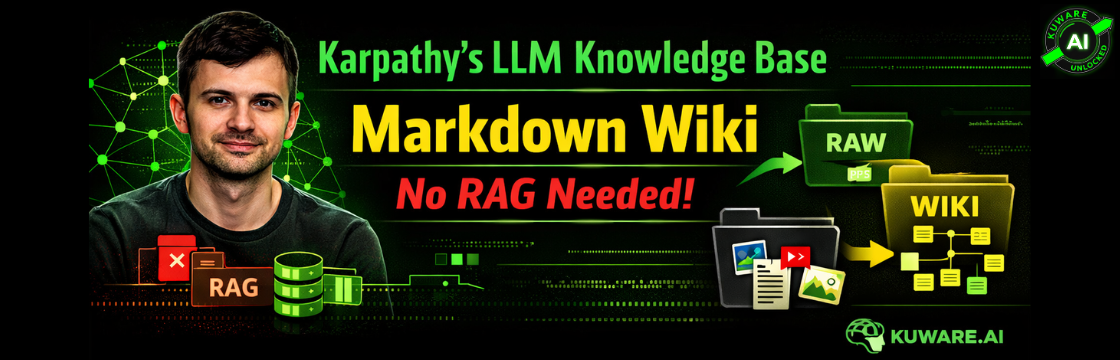
At the heart of this setup are just two folders.
That’s it.
Raw: Your Source of Truth
The raw/ folder is exactly what it sounds like.
You dump everything in here:
- PDFs
- research papers
- blog posts
- GitHub repositories
- datasets
- images
And you don’t touch it.
No renaming. No editing. No formatting.
This is important.
Because the moment you start modifying source material, you risk losing fidelity. The raw folder stays messy on purpose. It is your unaltered ground truth.
Wiki: The Living Layer
The wiki/ folder is where the system becomes intelligent.
Here, the LLM takes raw inputs and “compiles” them into:
- structured markdown documents
- concept pages
- summaries that preserve meaning without losing detail
- topic-based hierarchies
- cross-linked references
Think of it less like summarization and more like knowledge distillation with structure.
Each wiki file links back to its original source in raw/, so you always have traceability.
That alone solves one of the biggest issues with traditional AI systems: loss of provenance.
Where Obsidian Fits In
Obsidian makes a great lightweight interface for this knowledge base.
A very good one, but still just a viewer.
What it gives you:
- clean rendering of markdown
- easy navigation of folders
- backlink tracking between notes
- a graph view that shows how ideas connect
But the actual system is just files sitting on your machine or server.
That’s important.
Because it means you own everything. No lock-in. No hidden logic.
The Workflow: Surprisingly Natural
Here’s how this works in practice.
You find something interesting. Maybe a research paper or a long article.
You drop it into the raw/ folder.
Then you ask your LLM, whether it’s Claude, GPT-4o, or something else:
“Compile this into the wiki.”
That’s it.
The LLM reads the document and:
- creates a properly named markdown file
- decides where it belongs in the folder structure
- extracts key ideas in a structured way
- adds links to related concepts
- includes references back to the raw source
In the beginning, you guide it.
You might say:
“Group this under transformers” or “this belongs in optimization techniques.”
But after a dozen or so documents, something interesting happens.
The LLM starts to understand your structure.
Now you just say:
“File this.”
And it does the right thing.
Scaling Without RAG: Why This Actually Holds Up
This is where I expected things to break.
Because without embeddings or vector search, how does it scale?
Karpathy mentions working with:
- around 100 articles
- roughly 400,000 words
And the system still feels responsive.
Why?
Because the LLM is continuously maintaining:
- small index.md files
- summary pages
- hierarchical organization
So instead of searching blindly through chunks of text, the LLM navigates a structured knowledge system.
It’s closer to how a human researcher works.
You don’t search every sentence ever written.
You go through organized ideas, summaries, and references.
Handling Images and Non-Text Data
This approach isn’t limited to text.
Images are stored alongside their source documents, often in subfolders like:
raw/transformer-paper/figures/
When compiling content, a vision-capable LLM can:
- describe images
- extract meaning from diagrams
- incorporate them into explanations
No special pipeline needed.
Which again reduces complexity significantly.
The Underrated Piece: Health Checks
This might be the most important part of the entire system.
Karpathy runs periodic “health checks” on the wiki.
Think of it as LLM-powered linting.
The model scans the entire knowledge base and:
- flags contradictions between sources
- identifies missing or incomplete information
- suggests new articles based on gaps or connections
- cleans up weak or outdated claims
You can even make it stricter.
For example:
- maintain a dedicated contradictions log
- force the system to reference that log before answering queries
Now you’re not just storing knowledge.
You’re actively maintaining its quality.
Over time, the system gets better, not messier.
Querying the System: Where It Gets Interesting
Once your wiki reaches a certain size, querying becomes very powerful.
You’re no longer just asking questions.
You’re asking the LLM to:
- traverse a structured knowledge base
- synthesize ideas across multiple documents
- generate new outputs
And those outputs can be anything:
- markdown reports
- presentations (like Marp slides)
- data visualizations
- summaries of entire topics
Here’s the key part.
These outputs are written back into the wiki.
So every query contributes to the system.
It compounds.
Comparing This to NotebookLM
At a glance, this might feel similar to NotebookLM.
You upload documents. You ask questions. You get answers.
But the differences are significant.
With NotebookLM:
- you don’t see how knowledge is structured
- contradictions are hidden behind generated summaries
- everything lives in someone else’s system
With this approach:
- every file is visible
- every link is traceable
- every decision can be inspected
And perhaps most importantly, everything is local or under your control.
That changes how you trust the system.
Where This Can Go Next
Karpathy hints at some future directions that are worth thinking about.
You could:
- fine-tune a small model on your wiki
- generate synthetic data based on your knowledge base
- create multiple LLM agents that collaborate
For example:
- one agent compiles new knowledge
- another checks for consistency
- a third generates reports
Now your knowledge base becomes an active system.
Not just storage.
Why This Matters (Especially If You Build AI Systems)
Let me zoom out for a moment.
In most AI conversations, the focus is on models.
Bigger models. Faster models. Better models.
But in real-world applications, the bottleneck is usually not the model.
It’s the data and how it’s organized.
This approach addresses that directly.
- Raw data preserves truth
- The wiki creates clarity
- The LLM maintains structure
- Health checks ensure integrity
You end up with a system that is:
- transparent
- maintainable
- extensible
- and actually usable day to day
My Take After Looking at This
I’m not saying RAG is dead.
It has its place, especially at scale or in production environments with strict latency requirements.
It has its place, especially at scale or in production environments with strict latency requirements.
But for a lot of use cases, especially:
- research
- internal knowledge systems
- domain expertise building
This approach is incredibly compelling.
It’s simpler to build.
Easier to maintain.
And in many ways, more aligned with how humans actually think.
If You Want to Try This
Start small.
Don’t overthink it.
- create a raw/ folder
- create a wiki/ folder
- pick an LLM you’re comfortable with
Then take one document.
And say:
“Compile this into the wiki.”
That’s it.
Once you see it working, you’ll understand why this approach feels different.
And honestly, if you’re in the business of building AI solutions, whether for yourself or clients, this is a pattern worth paying attention to.
Because it’s not just about answering questions better.
It’s about building systems where knowledge improves over time instead of decaying.
