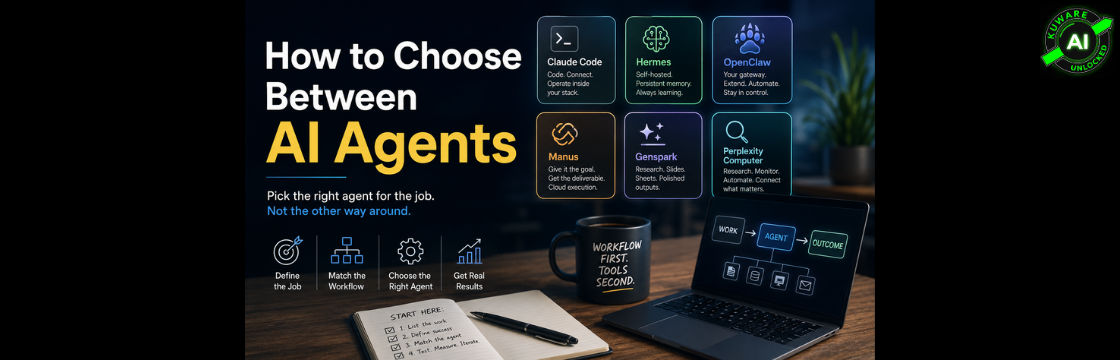
There are suddenly dozens of AI agents promising to research, code, automate, browse, monitor, and basically run your business.
The obvious question is:
“Which AI agent should I use?”
That is the wrong first question.
The useful question is: What work already exists in your business, and which of those jobs is actually ready to be handed off to AI?
Only after you answer that do the tools start to make sense.
Because “AI agent” has become an absurdly broad category. A self-hosted agent running continuously on your server is not the same thing as a cloud agent that creates a presentation for you. A research agent isn’t the same as an agent monitoring an operational system. And a coding agent connected to your files and infrastructure isn’t automatically the right tool for either of those jobs.
Treat them as interchangeable and you’ll probably choose whichever agent has the best demo.
That’s backwards.
Don't Buy an Agent Until You Know the Job
Start with the work.
Maybe someone on your team checks advertising accounts every morning for problems.
Maybe operations pulls information from four systems every Friday and turns it into a report.
Maybe someone researches competitors before every sales meeting.
Maybe your team repeatedly takes raw data, analyzes it, and builds a presentation for management.
Those are jobs.
Now we can ask a useful question: What kind of agent should own each job?
This distinction matters because the current crop of agents falls into several very different shapes.
Some agents live inside your infrastructure
They can run on a machine you control, access approved files and systems, use APIs or MCP connections, maintain state, and perform recurring work.
Some agents live in the cloud
You give them an objective. They spin up an environment, perform the work, and return a deliverable.
Some are built around scheduled automation
They don’t necessarily sit there continuously thinking. Something triggers them, they perform a defined job, deliver the result, and wait for the next trigger.
Others specialize in research and knowledge work
Their advantage comes from finding information, synthesizing it, working across sources, and producing something useful from it.
These differences matter much more than which agent happens to be getting attention on X this week.
First, What Is an AI Agent?
A chatbot answers questions.
An agent does work.
That’s the simplest distinction.
A useful agent can take an objective, break it into steps, use tools, browse, read and write files, call APIs, interact with software, and produce an outcome.
That outcome could be a research report. Or a spreadsheet. Or code. Or an updated CRM record. Or an alert telling you something went wrong.
And increasingly, it can be an entire recurring business process.
That’s where agents get interesting.
But it also explains why asking for the “best AI agent” makes about as much sense as asking for the best employee without specifying the job.
So let’s look at six of the major options through that lens.
1. Claude Code: Best When the Agent Needs to Work Inside Your Stack
Claude Code started as a coding agent, but thinking of it purely as a coding tool now undersells what it can do.
Put Claude Code on a machine with access to the right tools, files, repositories, APIs, and MCP servers, and it can become a capable operational agent.
That makes it particularly interesting when the work happens inside systems you control.
For example, an agent could inspect files, query connected systems, analyze the results, update something, generate a report, and commit changes to GitHub.
Claude Code also now has several ways to handle recurring work.
Inside an active session, scheduled tasks and /loop can rerun prompts, although those tasks are session-scoped and recurring tasks expire after seven days. For durable cloud automation, Anthropic’s Routines can run on schedules, API calls, or GitHub events from Anthropic-managed infrastructure, even when your computer is off.
That’s an important distinction.
Claude Code can participate in both interactive work and automated workflows, but how you deploy it changes what kind of agent it becomes.
Good fit: Work involving code, files, APIs, MCP connections, repositories, and operational systems.
Less compelling fit: You simply want to describe a business deliverable and have a polished artifact appear without thinking about infrastructure.
2. Hermes: An Agent Designed to Learn as It Works
Hermes Agent from Nous Research takes a different approach.
Hermes is open source and built around persistent memory, reusable skills, scheduling, tools, and a learning loop.
It doesn’t just remember conversations. Hermes can create procedural skills from experience and improve those skills as it uses them. Its documentation also supports persistent memory across sessions, MCP integration, built-in cron scheduling, and messaging through platforms including Telegram, Discord, Slack, WhatsApp, Signal, email, and Microsoft Teams.
That’s an interesting model for recurring operational work.
You don’t necessarily want an agent rediscovering how to perform the same task every Monday morning.
You want it to get better at the task.
Hermes can also run locally, through Docker, over SSH, or using remote execution environments. Its gateway can stay running and receive work through messaging platforms.
Good fit: Persistent agents, recurring jobs, memory-heavy workflows, self-hosting, and situations where you want the agent’s knowledge and skills to compound.
Less compelling fit: Organizations that don’t want responsibility for deploying, securing, monitoring, and maintaining an agent environment.
3. OpenClaw: Build Your Own AI Operating Layer
OpenClaw occupies some of the same territory as Hermes, but the philosophy feels different.
OpenClaw is a self-hosted gateway connecting AI agents with messaging channels, models, tools, skills, scheduling, webhooks, and automation.
It supports channels including Slack, Telegram, WhatsApp, Signal, Microsoft Teams, Discord, and others. Its ClawHub ecosystem provides skills for systems including GitHub, Gmail, Google Drive, Google Sheets, Notion, Calendar, Linear, and Trello.
OpenClaw also has persistent scheduled jobs through its Gateway. Cron jobs can wake an agent, execute recurring work, and deliver results back to a chat channel or webhook.
So if you want an AI assistant that lives across your systems and communication channels, OpenClaw starts looking less like another chatbot and more like infrastructure.
Good fit: Organizations that want a self-hosted, extensible agent gateway with lots of integrations and automation options.
Less compelling fit: Teams that want somebody else to manage all the infrastructure.
4. Manus: Give It the Job, Not Every Step
Manus represents the other side of the spectrum.
Instead of building an agent environment yourself, you give Manus a goal and let it work in its own environment.
That makes it attractive for tasks where you care primarily about the finished deliverable.
Research something. Analyze data. Build a website. Create documents. Run code.
But Manus has also evolved beyond purely temporary task execution. Its Cloud Computer provides a persistent virtual machine where applications, scripts, files, and processes can remain active 24/7 between sessions.
That changes the comparison considerably.
The original distinction between “self-hosted persistent agent” and “temporary cloud agent” is becoming less clean because cloud agent platforms are adding persistence too.
The bigger question becomes who owns and operates the environment.
With Manus, Manus does.
Good fit: Delegated projects, research, analysis, web work, documents, and workflows where you want the cloud environment handled for you.
Less compelling fit: Work where infrastructure ownership, local control, or deeply customized internal architecture matters.
5. Genspark: When the Deliverable Matters as Much as the Work
Genspark is also moving toward a broader agent workspace.
Its Super Agent coordinates specialized agents for research, content, data analysis, design, coding, communication, and other tasks. Genspark says the system combines more than 30 models, 150 tools, and hundreds of MCP integrations.
Where Genspark becomes particularly interesting is output.
Slides. Sheets. Documents. Research. Design. Calls.
For example, its presentation agent doesn’t simply dump text into PowerPoint. It provides a workspace for building, editing, analyzing data, generating charts, adding speaker notes, and refining the presentation conversationally.
Genspark also lets users turn workflows into reusable skills.
Good fit: Knowledge work that needs to become a polished business artifact.
Less compelling fit: Building a deeply controlled, self-hosted operational agent layer.
6. Perplexity Computer: Much More Than Research Now
This is one area where the original draft needed updating.
Calling Perplexity Computer primarily a research specialist is no longer accurate.
Research remains one of Perplexity’s strengths, but Computer has expanded into a much broader general-purpose agent.
Perplexity says Computer can browse, research, code, create, connect tools, automate workflows, schedule work, and perform continuous monitoring. It can run recurring tasks persistently and connect with tools including Gmail, Slack, Notion, and Calendar.
There is also Personal Computer, which extends the agent onto local computers. Perplexity describes it as an always-on agent with access to local files and native applications. The product is now available on both Mac and Windows.
So Perplexity now belongs much closer to the general agent category than it did when people primarily associated the company with AI search.
Good fit: Research-heavy workflows, connected knowledge work, browser automation, recurring monitoring, and workflows that benefit from Perplexity’s multi-model orchestration.
Less compelling fit: Organizations whose first requirement is a fully self-hosted, internally controlled agent stack.
So Which AI Agent Should You Choose?
Here’s the more useful comparison.
| Agent | Basic Model | Strongest Fit | Infrastructure Control |
|---|---|---|---|
| Claude Code | Coding and operational agent | Connected work inside code, files, APIs and MCP | High if self-hosted |
| Hermes | Self-hosted learning agent | Persistent memory and recurring workflows | High |
| OpenClaw | Self-hosted agent gateway | Multi-channel, extensible internal agent infrastructure | High |
| Manus | Managed cloud agent | Delegated projects and cloud execution | Lower |
| Genspark | Managed agent workspace | Research plus polished business deliverables | Lower |
| Perplexity Computer | Managed general-purpose agent | Research, connected workflows and monitoring | Lower, except Personal Computer adds local access |
Notice what’s missing from that table.
There is no winner.
That’s intentional.
Always-On, Scheduled, and Persistent Are Not the Same Thing
This distinction is going to matter more as companies deploy agents.
Suppose you want an AI system to check something every Monday at 8 a.m.
You probably don’t need an agent sitting there continuously.
A scheduler can wake it, run the job, send the result, and stop.
Now suppose you need something watching operational activity throughout the day, receiving events, maintaining context, and reacting when something changes.
That’s different.
You may need a persistent gateway, event-driven architecture, or an agent environment that remains available.
Hermes and OpenClaw explicitly support this persistent gateway model. Claude Code can become part of a persistent architecture when deployed appropriately. Manus now offers persistent Cloud Computers. Perplexity Computer supports recurring and continuous workflows.
The categories are converging.
Which means product checklists will become less useful.
Architecture and workflow fit will matter more.
Start With Work You're Already Paying For
This is the part of the agent conversation we think businesses are getting backwards.
People see an impressive AI agent and immediately start asking:
*”What could we do with this?”*
Wrong direction.
Start with:
“What are we already doing that we shouldn’t have to keep doing manually?”
Write down the recurring work inside your business.
Then look for work that is repetitive, expensive, slow, inconsistent, or dependent on someone remembering to do it.
Now ask whether an agent can perform that job reliably.
Not whether it can perform an impressive demo.
Reliably.
That’s the bar.
If a human still has to redo half the work afterward, you haven’t automated the job. You’ve added another step.
This workflow-first approach aligns with how KAI evaluates AI opportunities: start with the business problem and expected outcome, then select the technology based on ROI, implementation reality, and control requirements.
Level Two Comes Later
Once you’ve automated existing work, something more interesting happens.
AI makes previously uneconomical work possible.
Maybe you never monitored every customer account every day because hiring people to do it made no financial sense.
Maybe you never researched every prospect before outreach.
Maybe nobody analyzed thousands of support conversations every week looking for emerging problems.
Agents can make those jobs economically possible.
That’s where the long-term opportunity gets much bigger.
But don’t skip level one because level two sounds more exciting.
First remove work you’re already paying for. Then create capabilities you couldn’t justify before.
A Simple Way to Choose an AI Agent
Take one recurring workflow and write its definition of done in one sentence.
Then ask:
- Does it need continuous access to our systems?
- Does it need persistent memory across jobs?
- Does it need to run on infrastructure we control?
- Is the primary output research, an action, code, data, or a polished deliverable?
- Does it need to run continuously, react to events, or simply wake up on a schedule?
- What happens when it gets something wrong?
- How much human review does the workflow actually require?
Those answers will narrow the agent choice surprisingly quickly.
Connected technical work may point toward Claude Code.
Persistent self-hosted automation may point toward Hermes or OpenClaw.
A delegated cloud project may point toward Manus.
Presentation-heavy knowledge work may point toward Genspark.
Research, connected knowledge work, or monitoring may point toward Perplexity Computer.
And sometimes the right answer isn’t one agent.
It is several.
The Best AI Agent Is the One That Lets You Stop Doing the Job
This market is moving too quickly to build your AI strategy around today’s feature comparison.
Features will converge.
Agents will gain memory. Cloud products will gain persistence. Self-hosted products will become easier to deploy. Research agents will gain more tools. Coding agents will move further into operations.
We’re already seeing it happen.
So don’t start with the agent.
Start with the job.
Define what success looks like. Decide what systems the agent needs access to. Decide how much autonomy you’re willing to give it. Decide what happens when it fails.
Then choose the tool.
And after two weeks, ask one brutally simple question:
Did we actually stop doing the work?
If the answer is no, the agent hasn’t earned the job yet.
Find the job first. Then open the toolbox.
*Kuware AI helps established businesses identify which workflows are actually worth applying AI to, then designs and implements the systems behind them. An AI Assessment maps current workflows, friction points, data, and potential ROI before you commit to another tool.*
