Most businesses are still using AI the hard way.
Someone opens ChatGPT or Claude. Then they open the CRM. Then Google Drive. Then Slack. Then maybe a spreadsheet.
They copy something from one system, paste it into the AI, ask a question, copy the answer back somewhere else, and repeat.
It works.
But the human has become the integration layer.
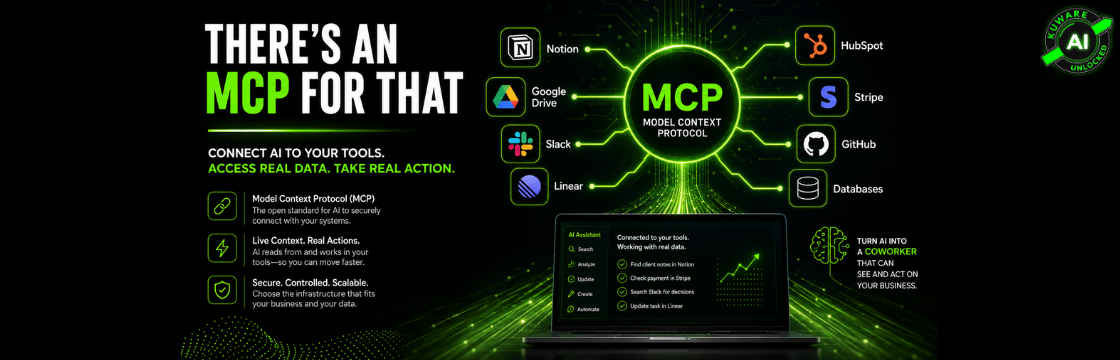
The real productivity jump happens when AI can reach into the systems you already use, get the information it needs, and, when you allow it, take action.
That’s what MCP makes possible.
And the ecosystem is growing fast enough that a useful question for almost any repetitive knowledge-work process is becoming:
Is there an MCP for that?
Quite often, the answer is yes.
What Is MCP?
MCP stands for Model Context Protocol.
It’s an open standard for connecting AI applications to external tools, systems, and data sources.
An MCP server can expose three important things to an AI application:
- Tools: Things the AI can do, such as creating a record or querying a database.
- Resources: Information the AI can access.
- Prompts: Reusable instructions or workflows.
The important part is standardization.
Before MCP, connecting an AI application to five different business systems could mean building and maintaining five different integrations.
With MCP, the AI client and the external system agree on a common protocol.
The MCP server essentially tells the AI, “Here are the capabilities available to you, here’s what each one does, and here’s the information you need to call it.”
The AI can then decide which available tool fits the task.
That makes MCP less like another SaaS integration and more like a common connection layer between AI and the rest of your technology stack.
MCP Is Not Just for Claude Anymore
Anthropic originally introduced MCP, which is probably why many people still associate it primarily with Claude.
That view is already outdated.
MCP has developed into a much broader ecosystem.
Compatible clients and hosts now include platforms and development environments such as Claude, ChatGPT, Cursor, VS Code, Codex, and others. Individual MCP providers support different combinations of clients, so compatibility still needs to be checked before assuming a particular server will work everywhere.
The protocol itself is also moving quickly.
The July 2026 MCP specification made a particularly important change for businesses: the protocol core became stateless for remote deployments.
That sounds technical, but the business implication is simple.
Remote MCP servers are becoming much easier to operate like normal web infrastructure.
They can sit behind standard load balancers, gateways, authorization systems, and monitoring infrastructure without maintaining the same protocol-level session state required by earlier versions.
MCP is moving from an interesting developer protocol toward infrastructure that can support serious production systems.
How Is MCP Different From a Regular API?
This distinction gets oversimplified.
MCP does not replace APIs.
In many cases, the MCP server is actually using the service’s API underneath.
The difference is the layer MCP adds for AI.
| Aspect | Traditional API | MCP |
|---|---|---|
| Primary consumer | Software written by developers | AI applications and agents |
| Typical interaction | Code calls predefined endpoints | AI discovers available capabilities and selects tools |
| Discovery | Developer reads API documentation | MCP server exposes its capabilities |
| Integration | Application-specific implementation | Standardized client-server protocol |
| Best suited for | Deterministic software integrations | Giving AI controlled access to tools and context |
An API gives software a way to communicate with another system.
MCP gives an AI application a standardized way to understand what capabilities are available and how to use them.
You still need authentication. You still need permissions. And somewhere underneath, an API, database connection, filesystem operation, or other interface usually does the actual work.
MCP standardizes the AI-facing layer.
That distinction matters.
Why MCP Matters for Productivity
A lot of the conversation around AI productivity still focuses on writing faster.
Write an email.
Summarize a document.
Create a presentation.
Draft a proposal.
Useful? Absolutely.
But there’s a much bigger productivity opportunity hiding in plain sight: eliminating the human handoffs between AI and business systems.
Imagine asking:
“What happened with the Acme account last week?”
Without connected systems, you may need to collect the CRM notes, relevant emails, project updates, and perhaps a payment record before the AI can answer intelligently.
With the right MCP connections, the AI can potentially retrieve that context itself.
Or:
“Find the last decision we made about the pricing change and create the appropriate implementation tasks.”
The AI could search the connected knowledge source, find the relevant discussion, and use a project-management MCP to create the tasks.
Or:
“Which customers have overdue invoices and open support issues?”
That could involve payment data, CRM records, and support information.
The point isn’t any single example.
You stop being the person carrying information from one application to another.
Multiply that friction by dozens of small tasks per employee, hundreds of times per month, and MCP starts becoming much more interesting than another AI feature.
What Are the Different Types of MCP Infrastructure?
Not all MCP connections work the same way.
Where the MCP server runs affects convenience, security, maintenance, scalability, and control.
There are four useful ways to think about the infrastructure.

1. Vendor-Hosted or Official Remote MCP
This is usually the easiest option.
The company that owns the product operates the MCP server. You authenticate, typically through OAuth, and the vendor handles the infrastructure, updates, and scaling.
Examples now include official remote MCP offerings from companies such as:
- Notion
- Stripe
- HubSpot
- Linear
- Atlassian for Jira and Confluence
- GitHub and other major platforms with supported MCP implementations
Notion, for example, operates an MCP service that lets compatible AI applications read from and write to a Notion workspace, subject to the user’s existing permissions.
HubSpot operates a remote MCP server that provides permission-aware read and write access to CRM data.
Linear centrally hosts its MCP server and provides tools for finding, creating, and updating issues, projects, and comments.
Atlassian provides its Rovo MCP Server for access to Jira, Confluence, Bitbucket, and other Atlassian data and actions.
Best for: Businesses that want the lowest-friction path and prefer the software vendor to manage the MCP infrastructure.
There’s effectively no MCP server infrastructure for your company to operate.
2. Self-Hosted Local MCP
Here the MCP server runs as a local process on your computer.
A common transport for this is stdio, where the AI client launches the MCP server and communicates with it through standard input and output.
There’s no public MCP endpoint required.
Common examples include:
- Filesystem access
- Git repositories
- Local development tools
- Browser automation such as Playwright
- Local databases
- Open-source MCP servers installed with tools such as npx or uvx
This model is particularly useful when the thing you want the AI to access already lives on your computer.
It can also reduce network exposure, but don’t confuse “local” with “automatically secure.”
A local MCP server can still execute commands, access files, use stored credentials, or connect to external services depending on how it was built and configured.
Permissions still matter.
Best for: Individual workflows, development, local files, private resources, and situations where you don’t need an always-on shared service.
3. Self-Hosted Remote MCP
This is where things become particularly interesting for established businesses.
Instead of running the MCP server on an employee’s laptop, you deploy it inside infrastructure you control.
That could be:
- Your existing cloud environment
- A VPS
- Docker infrastructure
- Kubernetes
- Cloudflare
- Another controlled hosting environment
Modern remote MCP implementations use HTTP, with Streamable HTTP established as the standard remote transport.
You might deploy:
- A PostgreSQL or Supabase MCP for controlled access to business data.
- A Google Workspace MCP implementation inside your own environment.
- An MCP layer around an internal CRM.
- A server exposing selected capabilities from an ERP.
- A custom MCP interface for internal APIs.
- A controlled set of operational tools available to your company’s AI agents.
Now multiple approved AI clients and users can access the same centrally managed capabilities.
And because you own the infrastructure, you can add your own authorization, logging, business rules, approval workflows, and security controls.
Best for: Companies that need centralized access, custom business logic, team usage, data-residency control, governance, or integrations that don’t exist commercially.
This is also where MCP becomes much more than a productivity hack.
It becomes part of your AI infrastructure.
4. Third-Party Hosted MCP
The fourth model sits between running everything yourself and relying on every individual software vendor.
A third party hosts MCP servers or provides a gateway to a catalog of integrations.
Examples include platforms such as:
- Composio
- Smithery
- Glama
- Other MCP gateways and integration platforms
The attraction is obvious.
Instead of installing and maintaining a collection of servers, you may get access to many integrations through one platform.
Some provide free tiers, with paid plans for greater usage or additional functionality.
But there’s a trade-off.
Another company may now sit between your AI and your business systems.
That means you need to understand:
- What credentials the provider can access.
- What requests and responses it logs.
- How long data is retained.
- Where that data is processed.
- Whether data is used for training or analytics.
- What happens if the provider is compromised.
- How permissions and revocation work.
Best for: Rapid deployment and broad integration coverage when the provider’s security and data-handling model meets your requirements.
Convenience is valuable.
But convenience isn’t a security policy.
Where Do You Find MCP Servers?
This ecosystem is still moving quickly.
Useful starting points include the official Model Context Protocol ecosystem and repositories, vendor documentation, MCP directories such as Smithery and Glama, mcp.so, and various curated GitHub lists.
But here’s an important rule:
Finding an MCP server in a directory doesn’t mean you should connect it to company data.
Treat MCP servers like software.
Check who maintains the server. Review the source when appropriate. Understand what permissions it requests. Verify where credentials go. Check whether an official vendor implementation exists before installing a random community version.
If you’re giving an AI the ability to read customer data, modify CRM records, send messages, or execute commands, “I found it on GitHub” isn’t enough due diligence.
Which MCPs Can Almost Every Business Start Using?
You don’t need 30 MCP servers.
In fact, that’s probably the wrong way to start.
Start with the systems where employees already spend their day moving information manually.
| MCP / System | Typical Hosting | What It Can Unlock | Most Relevant For |
|---|---|---|---|
| Notion | Vendor-hosted | Search knowledge, read context, create and update pages | Knowledge-heavy teams |
| Google Workspace | Community, custom, or platform integrations | Gmail, Calendar, Drive and document workflows | Most knowledge workers |
| Slack | Available through supported/community integrations depending on environment | Conversations, decisions and team context | Slack-heavy organizations |
| HubSpot | Vendor-hosted | CRM records, customer context and supported updates | Sales and customer teams |
| Salesforce | Vendor and ecosystem options | CRM and customer workflows | Sales and enterprise teams |
| Stripe | Vendor-hosted | Payment, customer and subscription information plus supported actions | Finance, support and sales |
| Linear | Vendor-hosted | Issues, projects, comments and workflow updates | Product and operations |
| Jira / Confluence | Vendor-hosted through Atlassian Rovo MCP | Projects, issues, knowledge and documentation | Product, engineering and operations |
| PostgreSQL / Supabase | Commonly self-hosted | Controlled access to operational data | Analysts and operators |
| n8n | Self-hosted or hosted configurations | Connect AI actions to larger automated workflows | Operations and automation teams |
For many businesses, knowledge, email, calendar, files, CRM, and project management are enough to uncover significant workflow opportunities.
Don’t start by asking, “How many MCPs can we install?”
Ask:
Where are people repeatedly moving information between systems by hand?
That’s where the ROI is.
MCP Gets More Powerful When You Connect Multiple Systems
A single MCP connection is useful.
Multiple carefully governed connections are where things get interesting.
Suppose an operations leader asks:
“Which active clients have unresolved project issues, haven’t heard from us in seven days, and have a renewal coming up?”
That question could require data from a CRM, project-management system, email platform, and perhaps billing.
Today, an employee may have to manually assemble that answer.
An AI system with permissioned access to those systems can potentially gather the information, reason across it, summarize what matters, and prepare the next actions.
Now go one step further:
“Prepare the follow-ups, create tasks for the account owners, but let me approve everything before anything gets sent.”
That’s no longer just AI answering a question.
That’s an operational workflow.
And this is exactly why businesses need to think about MCP as infrastructure rather than a collection of clever connectors.
The Security Question Matters
The upside of MCP is also its risk.
You are giving AI systems access to tools.
Sometimes those tools only read information.
Sometimes they can write to databases, update CRM records, create tickets, modify documents, send communications, or trigger other systems.
That means businesses should apply familiar security principles:
Use least-privilege access. Separate read access from write access where possible. Require human confirmation for consequential actions. Control which MCP servers employees can connect. Maintain logs. Review third-party providers. Revoke unused connections. Protect credentials.
And don’t assume OAuth alone solves the problem.
OAuth helps control authorization. It doesn’t tell you whether giving a particular AI agent a particular capability is a good idea.
The question isn’t simply:
“Can the AI connect?”
The better question is:
“What should this AI be allowed to see and do?”
That’s an AI governance decision.
Don't Connect Everything Just Because You Can
This is where businesses can easily repeat the same mistake they made with SaaS.
A new technology appears, everyone starts adding tools, and six months later nobody knows what connects to what.
MCP makes integrations easier.
That doesn’t mean every integration creates value.
Start with a workflow.
Map what the employee does today.
Identify the systems involved.
Measure the friction.
Then determine whether MCP can remove enough of that friction to justify the implementation and risk.
Strategy first. MCP second.
That’s a much better approach than installing every interesting MCP server you discover.
Final Thought: There Probably Is an MCP for That
MCP isn’t another AI toy.
It’s part of the connection layer that can turn AI from something you talk to into something that can work with the systems your business actually runs on.
That’s a big distinction.
The first phase of business AI was largely:
Ask AI something. Get an answer.
The next phase looks much more like:
Give AI a goal. Let it securely gather the right context, use approved tools, and complete parts of the work.
MCP is one of the technologies making that transition possible.
The companies that figure this out won’t necessarily have fewer people.
They’ll have fewer people wasting time copying information between applications, hunting for context, updating the same information twice, and acting as human middleware between AI and software.
So look at the repetitive workflows inside your company.
Every time someone says:
“I have to go into this system, grab this, paste it over there, check something in another system, then update this…”
Ask a different question.
Is there an MCP for that?
There very well might be.
